Deploy and run your app, task by task
For people who deploy and run apps on PitchStation: getting access, a first deploy with an AI assistant or the Apps client, then addresses, access, settings, monitoring, recovery and data. One section explains what the people you share an app with will see.
How to read this manual. ps-apps means ~/.pitchstation/ps-apps, the client launcher you set up in §02. Commands run from a work folder outside your project, ~/.pitchstation/demo-crm/ in the examples, and --source points at the project. Labels in bold are exactly as on the Apps page. The examples use one fictional app, demo-crm (id 41).
§01Before you start
Know what Apps is, whether you can use it, which hosts and limits apply, how your token is kept, and which way in suits you.
What Apps is
Apps runs a project in Docker on a host PitchStation manages. It takes a project with a Compose file, or a Vite + React or Next.js (standalone) project. A Compose file (compose.yaml) lists the containers your app runs as, called services; for a Vite or Next.js project the Apps client writes one for you (see §16 Glossary).
The host builds your images, so a first deploy needs no Docker on your computer. You need Docker only to build image archives yourself (§04).
- Your app gets an HTTPS address,
demo-crm.apps-ap.pitchstation.aiordemo-crm.apps.pitchstation.aidepending on its host, or your own domain. - Access is public, or private with a password you keep. An expiry is optional.
- Every deploy is a numbered release. A readiness check proves the address serves your app.
- Changing an address or the access never rebuilds or restarts the app.
The overview has the short version: What you get.
Who can use it
An administrator turns Apps on per person, with the permission “Deploy hosted apps (containers)” (app.deploy). It is in no role preset, and signing up does not include it; administrators have it. With it, Apps appears in the sidebar between Dev instances and Documents.
Without it, /apps.html still opens, but every panel answers CAPABILITY_REQUIRED: You do not have permission to use this feature. If you are not signed in, the message reads 401: Authentication required. Please provide a valid token. and the page does not send you to sign in.
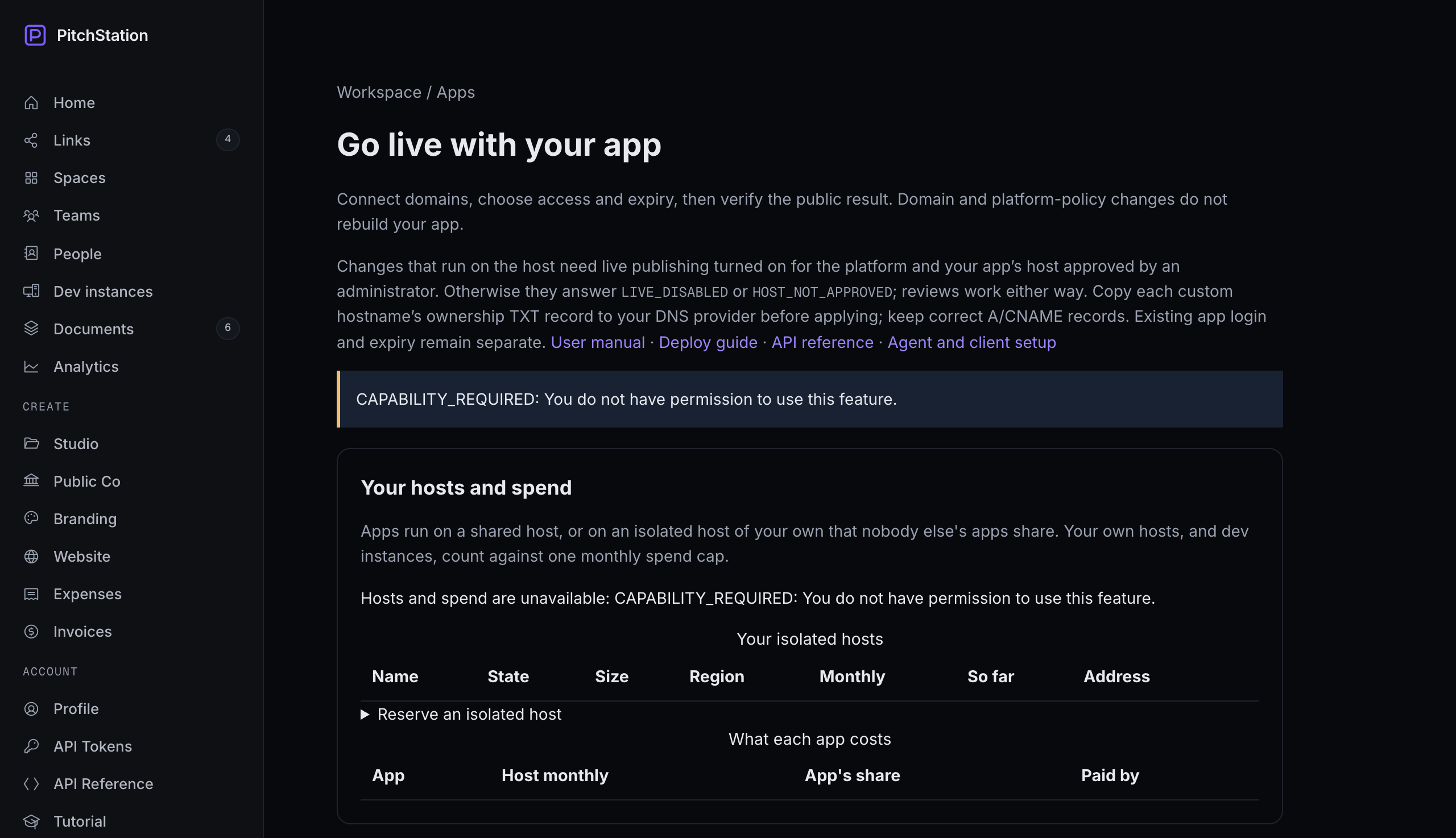 123
123- Dev instances — the sidebar has no Apps item below it yet.
- CAPABILITY_REQUIRED: You do not have permission to use this feature. — the status message, where every panel reports.
- Hosts and spend are unavailable: … — the hosts panel cannot load without the permission either.
Hosts and your quota
Shared hosts. Several people's apps share them, and the Compose rules and per-app budgets are enforced there. You can have 3 apps on shared hosts unless an administrator sets another number (0–100) for you.
Your own isolated host. You reserve it and an administrator launches it. Nobody else's apps run on it, and its apps do not count against the quota. See §14.
The two platform regions. Platform hosts in Singapore run ARM64, with addresses under apps-ap.pitchstation.ai. Platform hosts in Oregon run x86, with addresses under apps.pitchstation.ai. Which hosts you may use changes over time: ps-apps targets lists them, with free slots, free memory, CPU type, region and your quota. The overview keeps the status in this release.
Each app gets a default budget of 512 MB memory, 1 CPU and 256 processes.
exec format error. The official node, python and nginx images are multi-architecture.Your token, and where it lives
Make a token at /tokens.html: under Access, choose the Apps preset (scopes apps:read, apps:deploy and account:read). You need the permission first; until then the preset is marked not available.
The token starts with pst_ and is shown once. Choose an expiry (30, 90 or 365 days are offered). Keep Server only on: it refuses requests that carry a browser Origin header. An IP allowlist of up to 20 addresses is optional.
Keep the token in ~/.pitchstation/.env, readable only by you (§02 shows how, in your own terminal). Never paste it into a chat, and keep it off command lines: the client refuses --token. The one documented exception is the quick MCP registration, which stores the token in your assistant's settings; §02 also gives a way that keeps it in your file.
| Tool | Reads the token from | Note |
|---|---|---|
Apps client, through ps-apps | PITCHSTATION_APPS_TOKEN, then PITCHSTATION_TOKEN | The launcher loads ~/.pitchstation/.env for one command. |
| AI skill | the same launcher | It never asks for the token in chat. |
| MCP server | PITCHSTATION_MCP_TOKEN, then PITCHSTATION_TOKEN | Not PITCHSTATION_APPS_TOKEN. Set it when you register the server, or add it to your token file and register so the file is loaded (§02). |
devbox.py app-deploy | PITCHSTATION_APPS_TOKEN or PITCHSTATION_TOKEN | From the environment or from ~/.pitchstation/.env, so the Apps client's file is enough. |
| Apps web page | your signed-in browser session | No token needed. |
REST (curl) | what you send as Authorization: Bearer | Load it into one shell first (§10 shows how). |
SESSION_REQUIRED.Publisher terms, if your platform requires them
The terms appear only when an administrator setting requires them. Until you accept the current version, creating apps, live deploys, and quoting or reserving an isolated host answer TERMS_REQUIRED. Deploy dry runs still work.
Accept them on the Apps page with I accept these terms while signed in. ps-apps terms only shows them. Your assistant must never accept them for you.
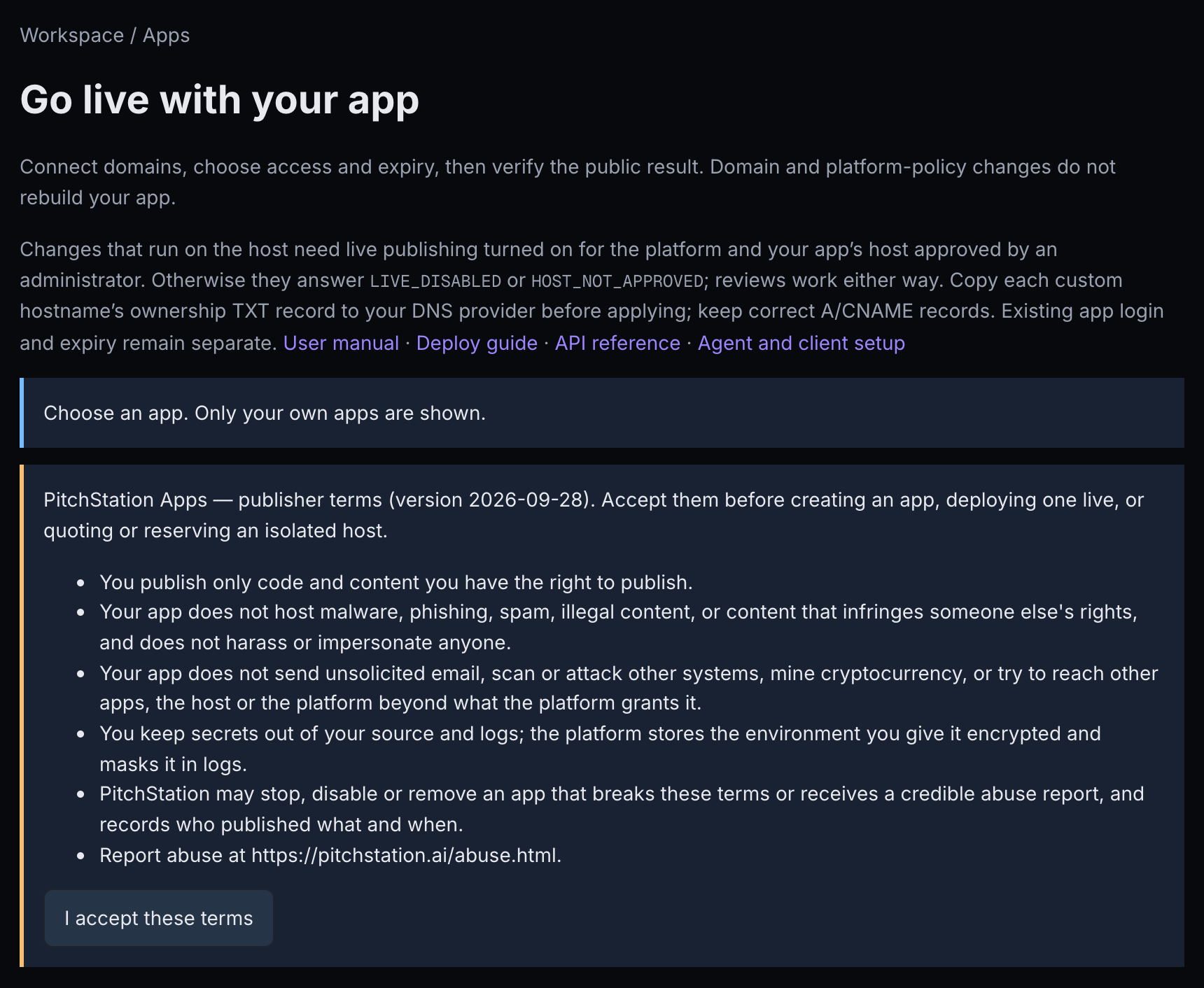 12
12- PitchStation Apps — publisher terms (version …) — the version and text you are accepting.
- I accept these terms — records your acceptance of this version.
Ways in, and which to pick
| Task | AI skill | Apps client | MCP tools | Web page | REST |
|---|---|---|---|---|---|
| See your apps and hosts | yes | list, targets | pitchstation_app_list | Application, Your hosts and spend | yes |
| Create an app | yes | create | — | — | yes |
| Deploy, redeploy | yes | deploy | pitchstation_app_deploy | — | yes |
| List releases | yes | releases | — | — | yes |
| Follow, retry, cancel an operation | yes | operation, retry, cancel | pitchstation_app_operation | Retry safe steps, Request cancellation | yes |
| Resolve an uncertain operation | yes | reconcile | — | Inspect the host, Confirm and unblock | yes |
| Custom domains | yes | domains | — | 1 · Domains, 3 · Review and apply | yes |
| Access, password, expiry | yes | policy | a password only, on deploy (password_file) | 2 · Access and expiry | yes |
| Access links | yes | links | — | Access links | yes |
| Callbacks, caching, PitchStation sign-in | yes | policy | — | Private app: callbacks, caching and sign-in | yes |
| Environment variables | yes | env | — | — | yes |
| Deploy settings | yes | settings | — | Deploy settings | yes |
| Read-only services | yes | hardening | — | Read-only file system | yes |
| Status, logs | yes | status, logs | pitchstation_app_status, pitchstation_app_logs | Status and logs | yes |
| Budget | yes | resources | — | budget fields | yes |
| Readiness, receipt | yes | readiness, receipt | pitchstation_app_readiness | Check readiness, Copy redacted receipt | yes |
| Roll back | yes | rollback | — | — | yes |
| Backups, restore | yes | backup-config, backups, restore | — | Backups (also Download) | yes |
| Move to another host | yes | move, moves | — | Move to another host | yes |
| Image archives | yes | archive, images | image_archive on deploy | list, Remove | yes |
| Isolated hosts, spend | yes | host-catalog, hosts, spend | — | Your hosts and spend | yes |
| Accept publisher terms | you accept | — | — | I accept these terms | web session; a scoped token is refused |
| Stop, delete | yes, by REST | — | — | — | yes |
The MCP tools stop at deploy and status because domain, access and env changes are reviewed plans: a conversation, not one tool call. The overview explains the channels: Ways in. Setting each one up is in the deploy guide's Set up once, and the REST conventions are in the API reference.
§02Quick start
Get one app live through the route you prefer, then see what to do next on the web page. Every route needs the permission and a token (§01). Choose private or public before you create the app; the deploy guide's app contract says how to shape the project.
With an AI assistant that runs commands (Claude Code, Codex)
The assistant follows the PitchStation Apps skill: it prepares the project, shows you each dry run and deploys only what you asked for.
Ask an administrator for the permission (§01), then make a token with the Apps preset at /tokens.html.
Run the box below in your own terminal, not in the assistant. It reads the token without showing it and writes ~/.pitchstation/.env, readable only by you.
This rewrites the whole file and makes it readable by you alone, even if an older setup left it readable by others. If you run it again for a new token, add the MCP server's line again afterwards (see the MCP route below).
Say the first box below to Claude Code or Codex, or install the skill yourself with the second. The skill's Setup also installs the Apps client and the ps-apps launcher.
Codex blocks the network by default: approve the commands that reach pitchstation.ai, or set network_access = true under [sandbox_workspace_write] in ~/.codex/config.toml. Codex also hides variables named like *TOKEN* from the commands it runs. That is why the launcher reads the token file itself: do not try to export the token instead.
Codex reads the same file from ~/.codex/skills/create-pitchstation-app/SKILL.md.
The agent loads the skill when the session starts.
Say the first box below. Use the second only if the app has no login of its own. If you do not say which, the agent asks and recommends private.
It reuses this project's app if there is one. It creates the password file without showing it. If the project needs a Dockerfile, a Compose file or a health endpoint, it adds them, lists the files and does not commit them. It creates the app, and the platform picks the host and says why. It runs a dry run and brings back anything you did not ask for. Then it deploys, follows the build and runs readiness.
The address is https://demo-crm.apps-ap.pitchstation.ai. For a private app, read the password in your own terminal with cat ~/.pitchstation/demo-crm.password and send it to your viewers separately. In a browser they see This app is private with a Password field and no user name (§07).
Readiness does not click through your app: try logins, video or 3D yourself.
| Things to ask later | Where it is explained |
|---|---|
| Redeploy to PitchStation, show me the dry run first. | §04 Deploy and redeploy |
| Put demo-crm on crm.example.com. Give me the DNS records to add, and apply once I say they are in place. | §05 Addresses and custom domains |
| My PitchStation app demo-crm is misbehaving. Show its container status (restarts, out-of-memory kills, usage against its budget) and the last 200 lines of its web logs, and explain what you see. Don't change anything. | §09 Watching your app |
| Raise demo-crm's memory budget to 768 MB. Show me the preview first. | §09 Watching your app |
| The last deploy of demo-crm failed. Show me the failed step and its output. If the operation says reconcile.by is "owner", inspect with the reconcile command and summarise what you find, then wait for me before recording anything. | §10 When something goes wrong |
| Make demo-crm public; it has no login of its own. Or: make demo-crm private again with a new password file. | §06 Who can open your app |
| Stop demo-crm, then delete it. Keep its data volume. | §10 When something goes wrong |
With an assistant without a shell (MCP)
Run the first box below. The MCP server reads PITCHSTATION_MCP_TOKEN (or PITCHSTATION_TOKEN), not PITCHSTATION_APPS_TOKEN, and the client file must sit in the same folder as the server. Other MCP hosts take the same command, arguments and env as JSON, with absolute paths.
--scope user registers the server for every folder. Without it, Claude Code offers the tools only in the folder where you ran the command.
This form puts the token on a command line and stores it in the assistant's settings. The two boxes after it keep the token in your own file instead.
To keep the token in your own file instead, add it for the MCP server once, then register with a command that loads the file each time the assistant starts the server:
Codex takes the same with codex mcp add.
It starts the MCP server and sees the six pitchstation_app_* tools.
Say the box below. Behind it the assistant calls pitchstation_app_list, then pitchstation_app_deploy as a dry run, waits for your confirmation, calls pitchstation_app_deploy again with apply and the key, follows pitchstation_app_operation until it succeeds, and runs pitchstation_app_readiness.
pitchstation_app_deploy takes it as marker; Vite projects get one automatically. Without it, readiness reports PUBLIC_CONTENT_MISMATCH. You can also set Expected page identity in 1 · Domains on the web page (§05).--scope user? Then Claude Code offers the tools only in the folder where you ran the command: run claude mcp list in your project folder to check.With the Apps client
The Apps client is one Node file (Node 20 or newer, no dependencies). Its output is JSON, so it suits terminals and CI.
As in steps 1 and 2 of the assistant route above.
The box below installs the client and ~/.pitchstation/ps-apps, which loads your token file for one command at a time. It ends by running targets, which lists your hosts and quota. Running it again updates the client. Do that if you installed it before this release: ps-apps help shows its clientVersion, and one older than 2026-10-02 has no releases command, no Next.js scaffold and no env_file in the Compose files it generates. With MCP, download pitchstation-apps.cjs again beside the server for the same reason.
Every later command runs there, and --source points at the project.
policy.json can hold the password, and app.json and env.json can hold secrets. An image archive written inside the project would be packed into the next upload, past the 80 MiB limit (SOURCE_INVALID). Make every file that holds a password or secrets readable only by you: write it, then run chmod 600 on it.The box below names the project type it found (framework: a Compose file, Vite + React or Next.js), the files it would generate and the exact file list. It makes no network call. A project it cannot package fails with ADAPTER_UNSUPPORTED: add a Compose file (§04, Projects the client can package).
Write app.json in the work folder. The table after it explains each field; only env can change later.
| Field | What it is | Can it change later? |
|---|---|---|
| slug | The name in your address, demo-crm.apps-ap.pitchstation.ai: lowercase letters, digits and hyphens, up to 40, unique across PitchStation Apps. | No |
| name | The label on the Apps page, “Demo CRM (demo-crm)”. | No: there is no rename |
| webService | The Compose service that receives visitors; web in the generated Compose file and the default. | No |
| containerPort | The port the web service listens on inside its container: the right-hand side of the Compose ports line. Use 3000, the default, for a project the client packages for you: the generated Vite image listens on 3000, and the generated Next.js image on containerPort. | No |
| healthPath | A path that answers 200 to anyone, without a login or redirect; the deploy fails if it does not. Make sure it exists before you create the app. In a Vite project a path such as /api/health answers 200, because the generated server falls back to index.html for paths without a file extension. | No |
| env | Settings and secrets your app reads (§08). Give them here if the first deploy needs them: ps-apps env works only after a release has gone live. | Yes, with ps-apps env |
Optional fields: "migrateCmd", "env": {…}, "resources": {"memMb": 768, "cpus": 1, "pids": 256}, "placement": {"arch": "amd64"}, and the deploy settings "migrateService", "hooks" and "composeFile" (§08). Leave out targetId and the platform places the app.
For a private app, make a password file first, then create with it (the first two boxes). For a public app with no login of its own, use the third. create has no dry run: the app and its address exist as soon as it succeeds.
Note the id in the output, "app":{"id":41,…}. Every later command takes it as --app 41, never the slug, and ps-apps list shows it again. To close the app on a date from the start, add --expires 2026-11-15T23:59:00+08:00 (§06, Expiry).
Pass --marker with 12 or more characters that your home page's HTML always contains, such as its title (text that JavaScript draws does not count). For a Vite project, leave it out: the marker is added for you. There is no --dry-run flag; leaving out --apply is the dry run.
In the output, check four things. source.files lists exactly the files you meant to upload, and no secrets. plan.liveUrl is the address. configuration.policy.access is private or public, as you chose. composePolicy.warnings is empty, or you understand each warning.
Add --apply, a key and --watch. If --watch stops after five minutes, follow the operation again with the second box; it keeps running either way.
Run readiness. A public app passes only when it declares that it has no separate restrictions; --application-policy none at creation did that.
As in the assistant route: the address, and for a private app the password, sent separately.
Then, on the web page
- Open Apps in the sidebar, or go to pitchstation.ai/apps.html, and choose your app in Application.
- Press Check readiness, then Copy redacted receipt (§09).
- Next: a custom domain (§05), access links for named people (§06), backups (§13), status and logs (§09).
The deploy guide covers the same ground for each channel: Set up once, Create the app, Deploy a release and declaring a public app.
§03The Apps web page, panel by panel
Know what every panel is for, when it appears, and where its task is explained.
Opening the page
Choose Apps in the sidebar, or open pitchstation.ai/apps.html; on a phone, open the menu first. /apps.html#app=41 opens one app directly. The page lists only your own apps, newest first; administrators also see only their own here.
The screenshots in this manual come from an example account: every name, address and value in them is fictional.
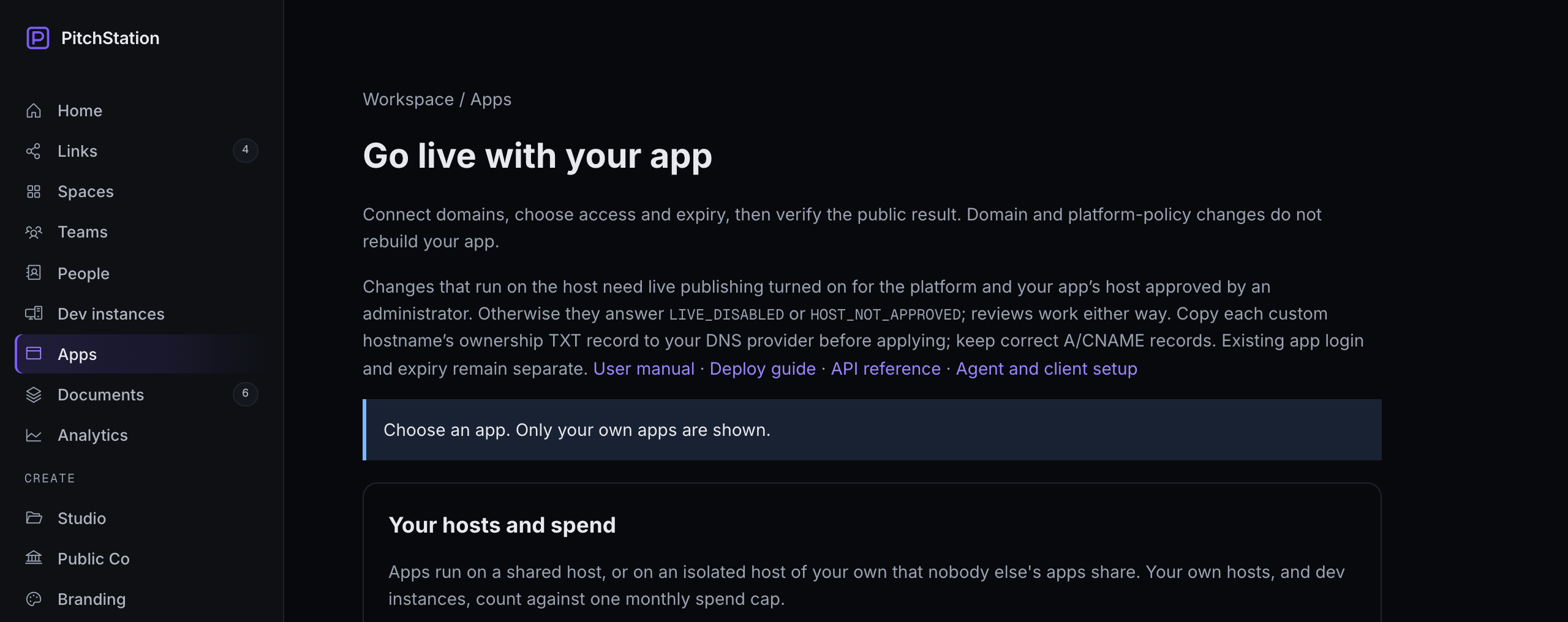 123
123- Apps — the sidebar item; it appears once you have the permission.
- Status message — where every panel reports its result or error.
- Your hosts and spend — your spend cap, isolated hosts and what each app costs (§14).
Where results and errors appear
Every panel reports in the single status message at the top of the page, which may be far from the button you pressed: after a click, look up. Errors show the code and a sentence; §11 explains each code.
How changes move through the page
Most changes are previewed first (Review …, Quote, Preview), then made with Apply selected plan, Apply, Apply budget, Move, Reserve, or Save in Deploy settings.
These act at once, with no preview: Save backup settings, Back up now, Create link, Save under Read-only file system, Retry safe steps and Request cancellation. These ask first, then act: Revoke (links), Remove (image archives), Cancel and Release (hosts).
The page makes its own idempotency keys, so applying the same plan twice returns the same operation.
The panels
| Panel, as on screen | Shown when | Use it to | Task |
|---|---|---|---|
| 1 · status message | always | read the results and errors of every panel | §11 |
| 2 · publisher terms, I accept these terms | your platform requires terms you have not accepted | accept them | §01 |
| 3 · Your hosts and spend | always | see your spend cap; reserve, cancel or release an isolated host; see each app's cost share | §14 |
| 4 · Application | always | choose one of your apps | — |
| 5 · Current state | an app is chosen | readiness headline, revisions, access, expiry, per-hostname state; Refresh, Check readiness, Copy redacted receipt | §09 |
| 6 · Status and logs | an app is chosen | containers, budget, logs | §09 |
| 7 · notices | an administrator took the app down, a move is running, or build-time settings changed | read what is blocking or stale | §08, §13 |
| 8 · Access links | the app is private | create, copy, revoke; see opens | §06 |
| 9 · Backups | an app is chosen | set up, back up now, download, restore | §13 |
| 10 · Move to another host | an app is chosen | review and start a move; abort; remove the old copy | §13 |
| 11 · Read-only file system | an app is chosen | list services with a read-only root file system | §08 |
| 12 · Deploy settings | an app is chosen | migration, hooks, Compose file path | §08 |
| 13 · Image archives | an app is chosen | list and remove uploaded image archives | §04 |
| 14 · Private app: callbacks, caching and sign-in | the app is private | callback paths, cache paths, people and teams | §06 |
| 15 · 1 · Domains | an app is chosen | addresses, identity marker, critical assets, then Review domain plan | §05 |
| 16 · 2 · Access and expiry | an app is chosen | access, password, expiry, event date, application policy, then Review policy plan | §06 |
| 17 · 3 · Review and apply | an app is chosen | saved plans, Verify DNS and ownership, Apply selected plan, DNS records | §05 |
| 18 · Operations and recovery | an app is chosen | follow, retry, cancel, resolve | §10 |
- Refresh in Current state reloads the configuration, plans, readiness and operations only. To reload links, backups, moves, settings and archives, reload the page: the address keeps
#app=41, so the same app opens again. - Status and logs load only when you press their buttons.
- Panels 5–18 appear only when the platform's publishing switch is on. If none appear after you choose an app, read the status message and ask an administrator. An app from before managed publishing shows Inventory required and needs an administrator first.
The notices read like this. Takedown: “An administrator took this app down on … It serves 404 and cannot be changed until the takedown is lifted.” Move: “Moving to host … Changes wait until the move finishes.” Build-time settings: “Build-time settings changed since this release was built (…). The running app still uses the old values until you deploy again.”
What the page does not do
| You want to | Use instead | Section |
|---|---|---|
| Create an app | ps-apps create or your assistant | §02 |
| Deploy or redeploy | ps-apps deploy, your assistant, or MCP | §04 |
| Upload an image archive | ps-apps deploy --image-archive or ps-apps images --file | §04 |
| Change environment variables or build-time scopes | ps-apps env | §08 |
| See release ids | ps-apps releases --app 41 | §04 |
| Roll back | ps-apps rollback | §10 |
| Stop or delete an app | REST, or your assistant | §10 |
| Detach a hostname | ps-apps domains plan with "detach" | §05 |
| See other people's apps | Administrators use the admin page | §18 |
The same tasks by client, MCP and REST are in the deploy guide's Operate table and the endpoint list.
§04Deploy and redeploy
Ship a release safely, repeat it safely, and know what the platform does with your files and images.
The rhythm: dry run, review, apply, follow
Every channel follows the same rhythm. The dry run deploys nothing and changes nothing on the host; it returns the plan and the exact file list. With an image archive (--image-archive, or MCP's image_archive) the archive itself is uploaded and kept: it appears under Image archives, and it can push an older one out of the newest three the platform keeps. The apply returns an operation id at once, and the release is live only when the operation reports succeeded. Closing your terminal or laptop does not stop the operation.
- Apps client: a dry run, then the same command with
--apply --key … --watch, thenoperation … --watchif needed (§02). - Assistant: “Redeploy to PitchStation, show me the dry run first.”
- MCP: the deploy request in §02.
- Web page: not possible; the page does not upload code.
Idempotency keys
A key names one intent: 8–128 letters, digits, dots, underscores or hyphens, for example release-20261002-01.
- Same key, same request: you get the same operation back (
duplicate: true). Nothing runs twice. - Same key, different request (for example, the source changed):
IDEMPOTENCY_KEY_REUSED. - After a transport error, repeat the identical command with the same key.
- After a failure, the same key only returns the failed operation. Deploy the fix with a new key.
- The web page makes its own keys.
Releases
Every deploy creates a numbered release. ps-apps releases --app 41 lists the app's 20 most recent releases: each one's id (what --release takes), when it was created, its status (pending while its deploy runs, then live, superseded or failed) and whether it is the live one. ps-apps list shows each app's currentRelease.
Data on named volumes survives every release; anything written inside the image is lost. A rollback brings back an earlier release's Compose file, not its env or settings, and its code only when each release's images carry their own tag: see §10 Roll back before you rely on it.
What a deploy does, and where it can stop
Before the first step, an operation that touches routing (deploys included) checks DNS and the TXT proof of every name the app has. A missing record makes it wait in waiting_external (§05, Keep the TXT record).
The steps run in this order: preflight, upload (and upload images), write env, Compose check, budget, build or load images, backup, copy of the backup to the platform, pre-deploy hooks, migration, up, health check, post-deploy hooks, activate, then routing and certificates, and readiness.
- The backup runs only when backups are set up and the app already had a release. Copying it to the platform (
backup-pull) only warns if it fails. - Pre-deploy hooks and the migration each run in a new one-off container of their service, from the new release's images (
docker compose run --rm), beforeupreplaces the running containers. Post-deploy hooks run the same way, after the health check. - Time limits: build 20 minutes, migration 15,
up10, health 5; any single remote step 30. - Failures before
up(upload, build or image load, pre-deploy hooks, migration) leave the previous release serving. Fromupon, the new containers have replaced the old ones on the same port. - A failure after the build or image load (the backup, a pre-deploy hook, the migration) has already replaced the host's images for the services it builds, under the same names, unless each release tags its images differently (§10, Roll back). The next env change, or a rollback to the release that is serving, then starts that build. Deploy a fix before either.
| Step name | What it does |
|---|---|
| preflight | Creates the release folder and checks that Docker and Compose run on the host. |
| upload · upload-images | Copies your source, and an image archive if you sent one, to the host. |
| write-env | Writes the release's .env with your settings (§08). |
| compose-policy | Checks the fully resolved Compose model against the host's rules (§15). |
| resources | Applies the app's budget (§09). |
| build · load-images | Builds the images on the host, or loads them from your archive. |
| backup · backup-pull | Backs up the running release's data and copies it to the platform (§13). |
| pre-deploy-1, pre-deploy-2, … | Your pre-deploy hooks (§08). |
| migrate | Your migration command. |
| up | Starts the new release's containers in place of the old ones. |
| health | Polls the health path for 200. |
| post-deploy-1, post-deploy-2, … | Your post-deploy hooks; they only warn. |
| activate | Records on the host which release now runs. |
| policy-runtime · tls:HOSTNAME · apply-routing | Installs the access policy, certificates and routing for each name. |
The health check. healthPath must return exactly 200 within about 60 seconds: 30 tries, 2 seconds apart, 5 seconds each. A redirect counts as a failure. A failed check's output starts unhealthy — last code: NNN and ends with the containers' last 40 log lines. A code of zeros (000 or 000000) means nothing answered at all (§12, The deploy fails its health check).
What gets packaged
| Kind | What |
|---|---|
| Left out automatically | .git, node_modules, .venv, venv, backup, backups, .aws, .ssh, .codex, .DS_Store, .next, .turbo; .env and .env.*; *.pem, *.key, *.p12, *.pfx, *.sqlite, *.sqlite3, *.db (and their -wal and -shm files); id_rsa, id_ed25519 (and .pub) |
| Kept | .env.example, .env.sample, .env.template, .env.dist |
| Left out with a warning | Postgres or PGlite data folders (they hold PG_VERSION or are pg_wal); Redis dump.rdb |
| Your own list | .pitchstationignore at the source root, in gitignore syntax (!, leading /, trailing /, *, ?, **); the first 1,000 lines count |
| Refused | Symbolic links, devices, unsafe or duplicate paths, files containing a PEM private key, an empty bundle. A tarball sent by REST is also refused for hard-link and sparse entries; the client packs hard-linked and sparse files as ordinary files. |
| Limits | 80 MiB compressed, 256 MiB unpacked, 20,000 files, paths up to 1,024 bytes |
ps-apps package shows exactly what would be uploaded, without any network call. Anything else in the project folder is uploaded, which is why input files and image archives belong in your work folder (§02).
The client gives the deploy upload up to 15 minutes and an image archive upload up to 60; every other call gives up after 30 seconds. On a slow connection, keep the bundle small, or build elsewhere and deploy an image archive.
Projects the client can package
| Project | Needs | Listens on | Readiness marker |
|---|---|---|---|
A Compose file (compose.yaml, compose.yml, docker-compose.yaml or docker-compose.yml at the root, or the path in your composeFile setting) | Your Dockerfiles or images. Only the web service publishes, as "127.0.0.1:${HOST_PORT}:3000" (the right side is your containerPort). Add env_file: .env to each service that reads settings (§08). | your containerPort | pass --marker |
| Vite + React (npm) | package.json with vite and react, a build script, package-lock.json and index.html | 3000 (nginx) | added for you |
Next.js with output: 'standalone' (npm or pnpm; in a workspace, add --app-dir apps/web) | A lockfile at the source root and a build script | containerPort, 3000 by default (node, as user node) | pass --marker |
Generated files go into the upload only; your project is not rewritten. Another kind of project fails with ADAPTER_UNSUPPORTED: add a Compose file.
Shared and strict hosts refuse privileged containers, host namespaces, the Docker socket, bind mounts outside the project and ports not on 127.0.0.1; §15 has the full list, and the deploy guide shows them with a scaffold in Deploy a release. Shape the app to the app contract: listen on 0.0.0.0 inside the container, keep data on a named volume, give it an unauthenticated health endpoint, and make the migration safe to repeat.
Build elsewhere: image archives
Build the images on your machine, in CI or on a Devbox and deploy them: the host loads them and builds nothing. The platform keeps your newest 3 archives plus the one the running release came from, up to 1,024 MB each.
- Every service with
build:needsimage: name:tag: images are loaded by tag. Use a tag that changes with each release, so a rollback can find the older images (§10). - The images must match your app's host CPU:
--platform linux/arm64orlinux/amd64, whicheverps-apps targetsshows for it. The shared hosts are fixed per host; an isolated host can be either type in either region. The dry run refuses a mismatch withIMAGE_ARCH_MISMATCH. deploy --image-archiveuploads the archive once; the same file is not sent again.ps-apps images --app 41lists the archives,--fileuploads one and--remove ARCHIVE_IDremoves one.- With MCP,
pitchstation_app_deploytakesimage_archive, an absolute path. - On the web page, Image archives lists and removes them. You cannot remove the archive the running release came from.
archive never overwrites an existing --output file; it stops before building and asks for a new name. An archive inside the project would be packed into the next upload.If the client reports that “the server's edge refused” a large upload before PitchStation saw it, make the archive smaller or ask an administrator.
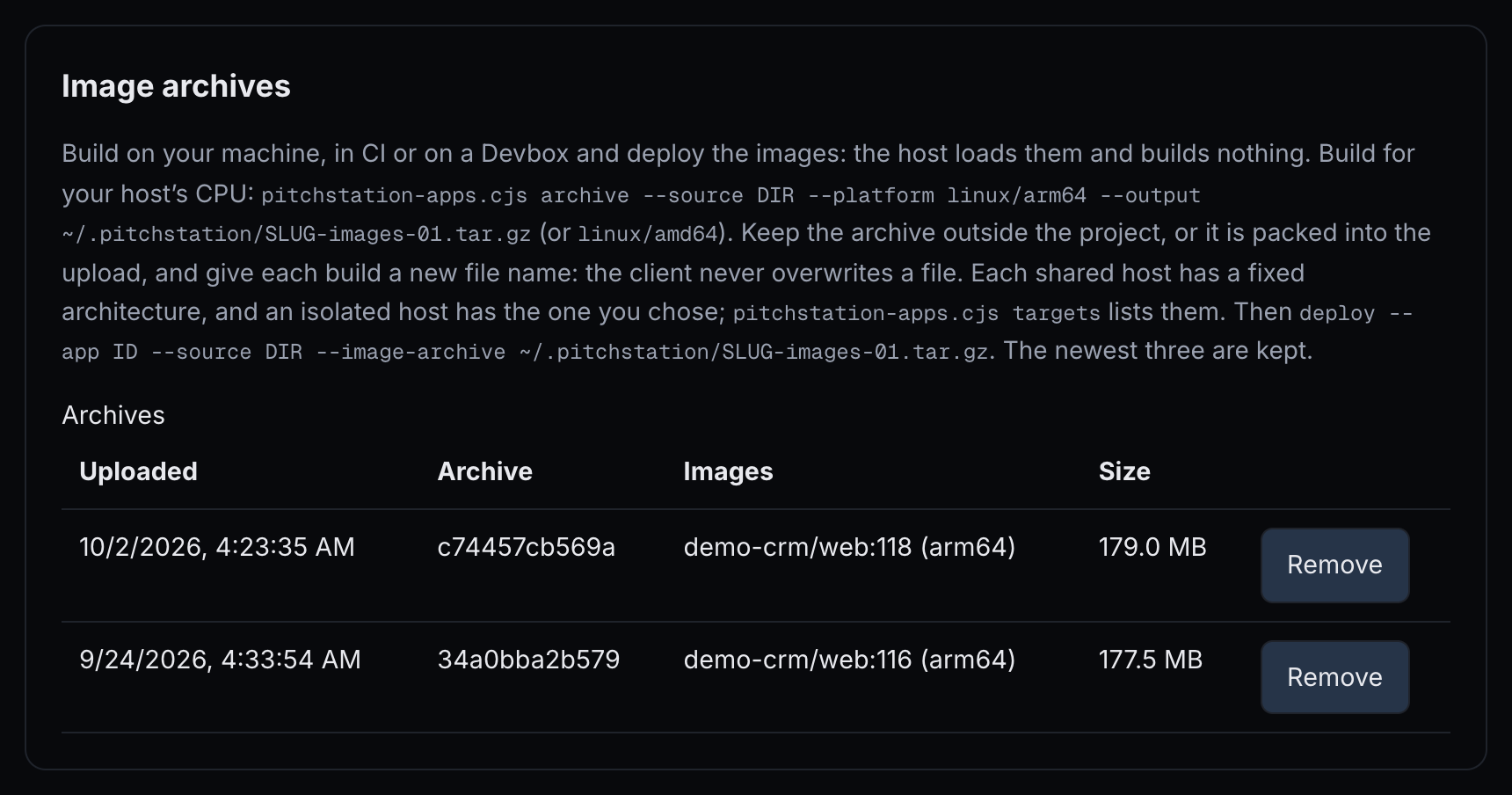 123
123- Archive — the first 12 characters of the archive's id, its SHA-256.
ps-apps images --app 41lists the full id, which--removetakes. - Images — each image's tag and CPU type.
- Remove — removes an archive you no longer deploy from; deploying from it again needs a new upload.
Build on a Devbox
If you use PitchStation dev instances (the pitchstation-devbox skill; see Dev instances), one command builds an archive on the box for your app's host CPU and deploys it. The skill installs devbox.py in ~/.claude/skills/pitchstation-devbox/. Your token reaches the box on the SSH session's input, never on a command line or its disk.
- It builds the project in
~/work/BOXon the box unless you pass--box-path. - Without
--applyit uploads the archive and returns the deploy's dry-run plan. With--applyand no--keyit makes a key of its own, then follows the operation for up to five minutes and prints where it ended; follow a longer one withps-apps operation … --watch. - The box needs Docker with Compose, Node 20 or newer, and
image:tags on built services. - It takes the Apps token from the environment or from
~/.pitchstation/.env, where §02 saved it.
The build ceiling
Builds on a host run one at a time, inside a ceiling — needs host setup. It defaults to 40% of the host's memory (at least 1,024 MB) and 1 CPU, unless an administrator set the host's own. A build that hits it fails with BUILD_LIMIT_EXCEEDED, and nothing else changes. Build elsewhere (an image archive or a Devbox) or make the build lighter.
An administrator installs the ceiling when onboarding a host. On a host without it, builds are not capped, and the 20-minute build limit still applies.
Redeploy
Run the same command with a new key. A redeploy keeps domains, access, env and the budget.
- Pass the same
--markeron every deploy, as the client advises. If you leave it out, the stored marker and critical assets are kept (a Vite project sends its own marker each time). A deploy that carries a marker replaces both: the critical assets become none (§05, Identity marker). - A redeploy never drops a private app's password. Leave
--password-fileoff: on a redeploy it sets the password again and signs everyone out (§06).
migrateCmd that uses &&, ;, | or $VAR fails the next dry run with DEPLOY_SETTINGS_INVALID. Rewrite it as sh -c '…' with ps-apps settings (§08).More detail for each channel is in the deploy guide: Deploy a release, What gets packaged, image archives and deploy settings. The API conventions are in Conventions and Operations.
§05Addresses and custom domains
Know your platform address, put the app on your own domain, manage aliases, and keep the ownership proof in place.
Your platform address
Every app gets its slug plus its host's base domain:
- Singapore's shared hosts:
demo-crm.apps-ap.pitchstation.ai - Oregon's hosts:
demo-crm.apps.pitchstation.ai - An isolated host without per-app DNS: the host's own label in between, for example
demo-crm.h7.apps-ap.pitchstation.ai
The address is reserved when the app is created, and the slug is fixed. In 1 · Domains, Platform address offers Keep serving with the same policy, 308 redirect to primary and Disable (404); in domains.json these are retain, redirect and disabled. While the platform address is the primary hostname, it must keep serving.
Put the app on your own domain
On the web page it takes five steps. The figures follow the steps, in the same order. They show a second name, www.crm.example.com, being added to an app that already serves crm.example.com; a first custom domain works the same way.
In 1 · Domains, fill Primary hostname, Aliases and Platform address, then press Review domain plan. The message reads “Plan saved. Review the configuration and DNS records, verify ownership, then explicitly apply.”
DNS records to add at your provider lists only what you must add: the TXT record _pitchstation.www.crm.example.com with the value shown, and the A record that points the name at the host's address. Copy record copies the record as one line: name, TTL, class, type and value. The platform address needs nothing from you; the page says so under the table. The records of names already verified are kept under Records of verified hostnames: keep them at your provider.
The Name column shows the full name. If your DNS provider adds your domain to whatever you type, enter only the part before it: _pitchstation.www.crm for example.com. If Verify DNS and ownership still reports OWNERSHIP_UNVERIFIED, compare the name your provider created with the table.
Press Verify DNS and ownership in 3 · Review and apply. It asks Cloudflare, Google and your domain's own name server. It issues no certificate and does not touch the app or its routing; a name that passes is recorded as verified, so its claim no longer lapses. A failure lists, for each name, the code and what each resolver saw.
Press Apply selected plan within 15 minutes of the review. The message reads “Operation … accepted. It will continue if you close this page.” Certificates are issued now.
DNS changes often take longer than 15 minutes to show. When the plan has expired, press Review domain plan again once Verify DNS and ownership passes, then apply. Reviewing again keeps the same TXT value and renews an unverified name's claim for another 24 hours.
Press Check readiness in Current state (§09).
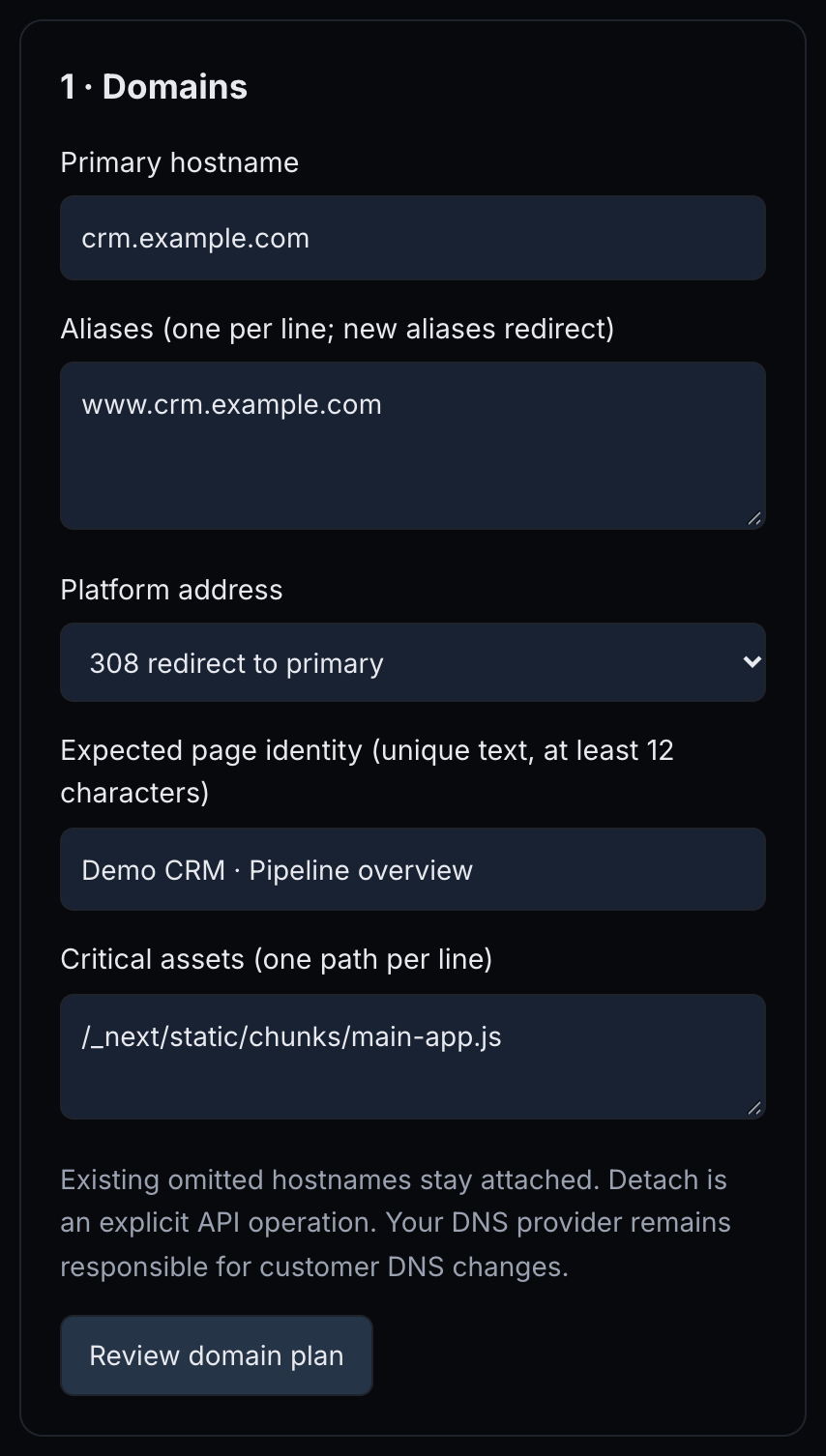 123456
- Primary hostname — the main address; redirects point here.
- Aliases (one per line; new aliases redirect) — more names for the app.
- Platform address — keep serving, redirect to the primary, or disable.
- Expected page identity (unique text, at least 12 characters) — the marker readiness looks for (§05, Identity marker).
- Critical assets (one path per line) — paths that must answer with real content.
- Review domain plan — saves a plan; nothing changes yet.
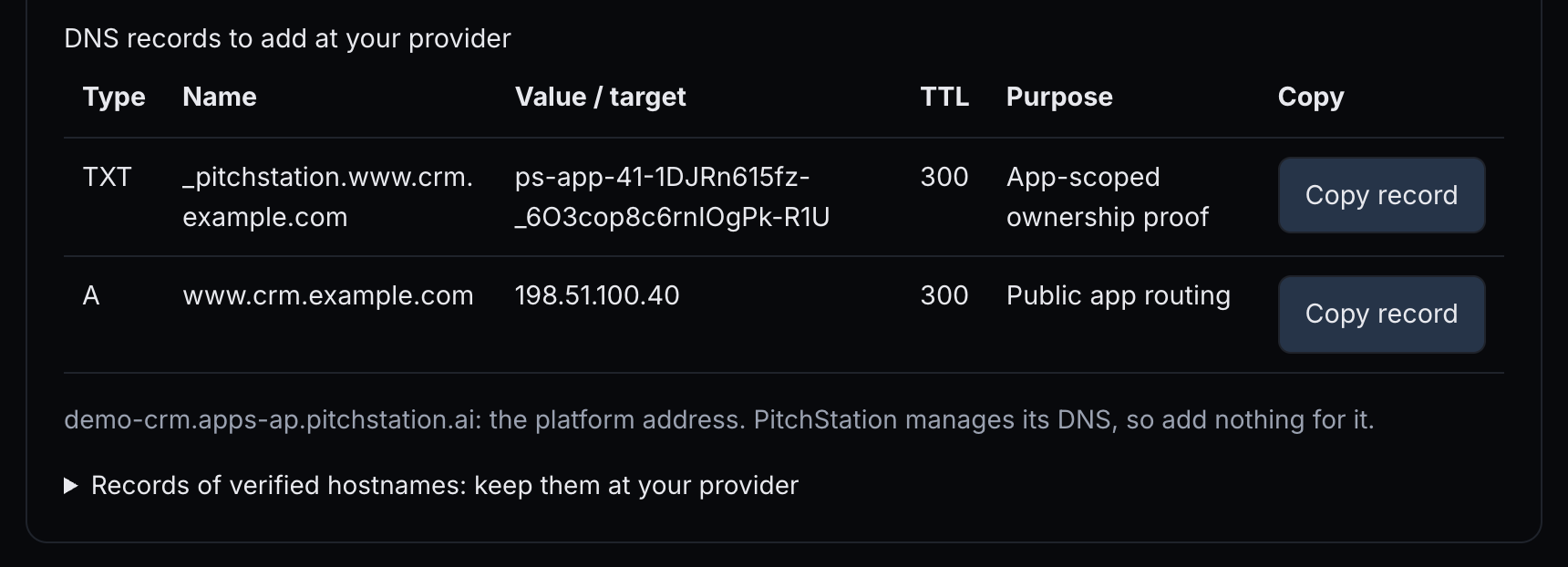 12345
12345- TXT
_pitchstation.www.crm.example.com— proves the name is yours. Keep it. - A
www.crm.example.com— sends visitors to the host's address. - Copy record — copies the record as one line: name, TTL, class, type and value.
- The platform address — PitchStation manages its DNS; add nothing for it. On a host registered with its own base domain, the note says the address resolves through that base domain's own DNS; add nothing for it either.
- Records of verified hostnames: keep them at your provider — the records of names already proven; deleting one stalls later deploys.
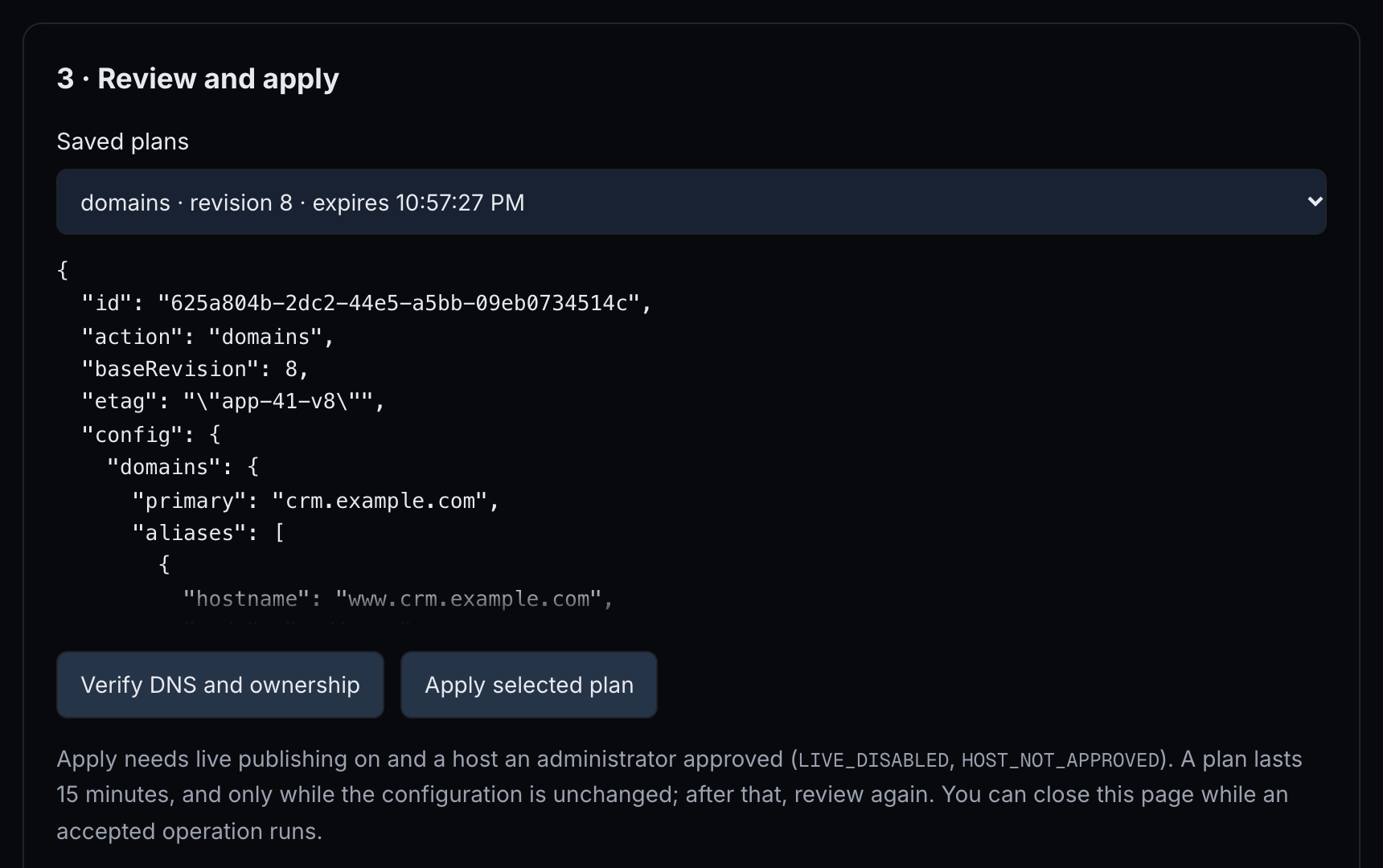 1234
1234- Saved plans — your reviewed plans, with their expiry.
- Plan preview — what the plan changes, before anything happens.
- Verify DNS and ownership — checks the records from three resolvers; it does not touch the app.
- Apply selected plan — starts the operation.

With the Apps client. Plan the domains, add the records, verify, apply, then check readiness. The plan's output prints its id and etag for the apply; keep the ETag's double quotes inside single quotes. If more than 15 minutes pass before you apply, plan again (the TXT value stays the same) and use the new id and etag. ps-apps show --app 41 also lists the records, under dnsRecords.
Add the records it lists at your DNS provider, then verify with the plan's id:
With an assistant: “Put demo-crm on crm.example.com. Give me the DNS records to add, and apply once I say they are in place.” Or: “Connect crm.example.com to this app. Keep its password and expiry; do not rebuild it.” With MCP this is read-only: pitchstation_app_status lists the pending records.
| Record | Name | Value | Why |
|---|---|---|---|
| TXT | _pitchstation.crm.example.com | the ps-app-41-… value from the plan | proves the name is yours; keep it |
| A (or AAAA) | crm.example.com | the host's address, for example 198.51.100.40 | sends visitors to the host |
| CNAME, instead of A for a subdomain | crm.example.com | your platform address | accepted; the check follows it |
| CAA, only if you use CAA | example.com | must allow letsencrypt.org | lets the certificate be issued |
| Other AAAA records | — | delete them | otherwise DNS_IPV6_CONFLICT |
A TTL of 300 seconds is suggested.
DNS_TARGET_MISMATCH, or DNS_IPV6_CONFLICT when the proxy also answers over IPv6 (Cloudflare does by default).Aliases, detaching and limits
- An alias either serves the app or redirects with 308 to the primary, keeping the path and query. On the page, new aliases redirect; in JSON, a plain name means redirect.
- Names you leave out of a new plan stay attached, as serving aliases. To remove one, add
"detach": ["old.example.com"]todomains.json; the web form cannot detach. - An app has at most 10 names, counting the platform address: 9 aliases when the platform address is the primary, 8 with a custom primary.
- Names under
pitchstation.ai,pitchstation.comand other apps' platform addresses are refused. - A name held by another app or a PitchStation website answers
DOMAIN_ALREADY_BOUND. An unverified claim lapses after 24 hours.
| domains.json field | Meaning |
|---|---|
| primary | The main hostname. |
| aliases | Names, or { "hostname": …, "mode": "serve" } / "redirect". |
| platform | retain, redirect or disabled. |
| detach | Names to remove from the app. |
| expected | The identity marker and critical assets for readiness. |
Keep the TXT record
waiting_external, retrying for about 75–90 minutes before it fails, and meanwhile other changes answer OPERATION_BUSY. Put the record back and retry (ps-apps retry). To drop the name instead, cancel the waiting operation first (ps-apps cancel --app 41 --operation ID), then detach the name with a domains plan ("detach") and deploy again.Identity marker and critical assets
Readiness proves that the address serves this app. It needs a marker: 12–256 characters your home page's HTML always contains, for example the text of its page title. Readiness reads the HTML as served and runs no scripts, so text that JavaScript draws does not count. Vite apps get one automatically. For other projects, pass --marker on every deploy, marker with MCP, or set Expected page identity in 1 · Domains.
Critical assets are up to 16 paths, one per line, that must answer 200 with real content. On the page they are sent only together with Expected page identity, so fill both.
--marker or MCP's marker, stores that marker with no critical assets. If you use critical assets, set them again in 1 · Domains after such a deploy, or with a domains plan that has "expected". For a project that is not Vite, you can instead set the marker and assets once there and leave --marker off your deploys.The deploy guide covers addresses in Addresses and access, and the ETag rules are in the API reference's Conventions.
§06Who can open your app
Choose public or private, manage the password and expiry, give named people their own way in, and open the paths machines need.
Public or private
- New apps are public, with Separate application login or expiry set to Unknown, unless you chose at creation.
- Private needs a password of 12–72 bytes that you keep. PitchStation stores only a hash and cannot show it again.
- Switching to public deletes the stored password; going private again needs a new one.
- To be private from the very first request, create the app with
--private --password-file(§02), pass--password-fileon the first deploy, orpassword_filewith MCP. Do not deploy publicly and add the gate later. - Leave
--password-fileoff later deploys: each one sets the password again and signs everyone out.
| On the page | In policy.json | Effect |
|---|---|---|
| Platform access: Public / Private preview | "access": "public" / "private" | Private shows visitors a sign-in page (§07). |
| New preview password (12–72 bytes; empty retains existing) | "password" | Empty keeps the current one; any password sent signs everyone out. |
| I retained the new password for a separate, secure handoff. | — | Required before the page sends a new password. |
| Expiry (your local timezone; empty means permanent) | "expiresAt" | ISO time with a timezone; null removes it. After it, every address answers 410. |
| Event date (optional, your local timezone) | "eventAt" | For your records; warns “Publication expires before the event.” |
| Separate application login or expiry | "applicationPolicy" | unknown, none or restricted. A public app passes readiness only with none. |
Change access, password or expiry
On the web page, fill 2 · Access and expiry, press Review policy plan, then Apply selected plan in 3 · Review and apply. Passwords are never saved in the browser or in receipts. If the app lets people sign in with PitchStation, making it public turns that off; the message says so when you review.
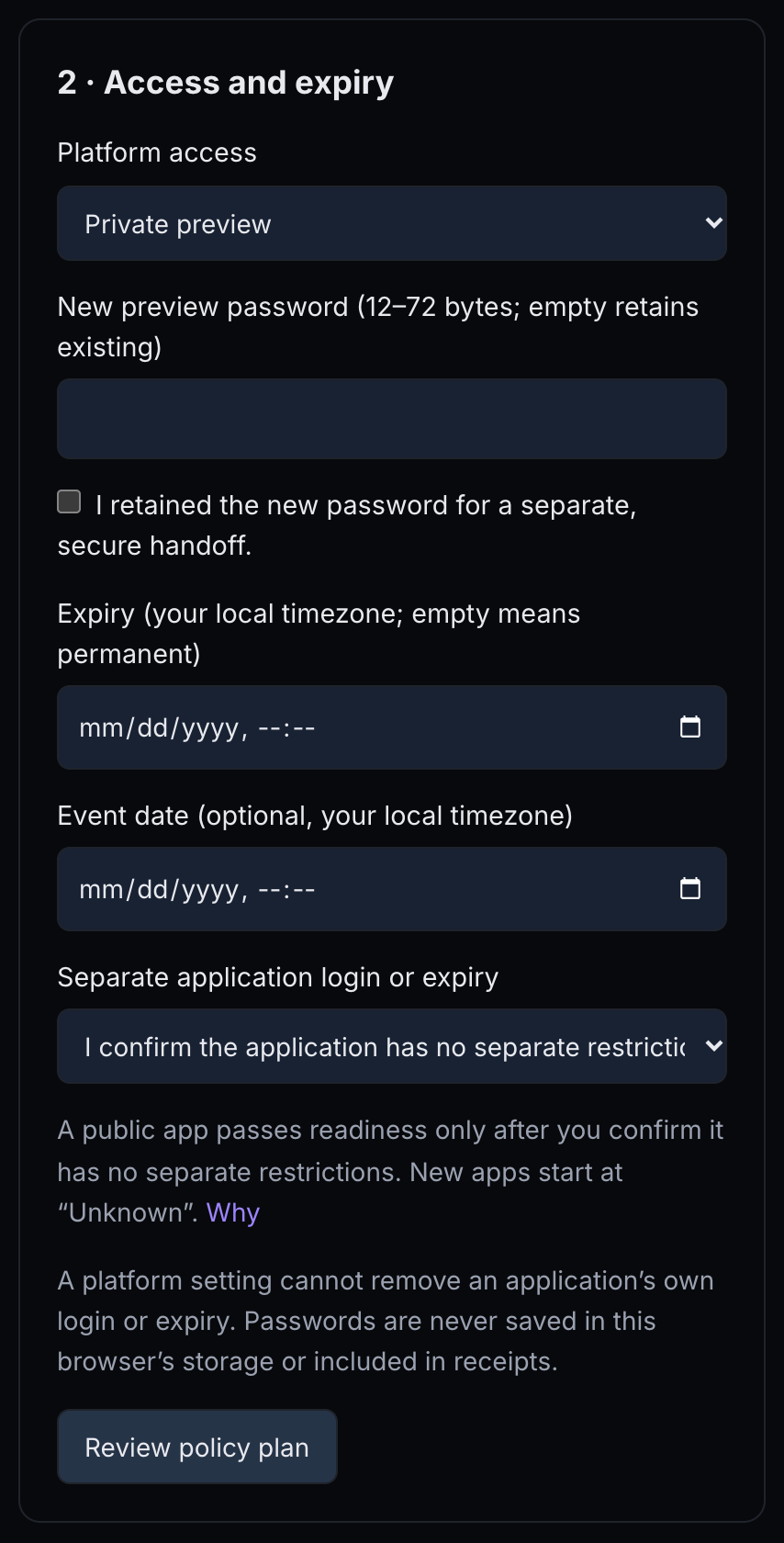 1234567
- Platform access — Public or Private preview.
- New preview password (12–72 bytes; empty retains existing) — only when you mean to change it.
- I retained the new password for a separate, secure handoff. — the page will not send a password without it.
- Expiry (your local timezone; empty means permanent) — when every address closes.
- Event date (optional, your local timezone) — for your records.
- Separate application login or expiry — what your app restricts by itself.
- Review policy plan — saves a plan to apply in 3 · Review and apply.
With the Apps client, the password goes inside an owner-only policy.json; policy has no --password-file.
Check the plan, then apply it with its id and etag:
password out unless you mean to change it. Every plan that carries a password replaces it and signs everyone out, even when the value is unchanged. To renew the expiry only, plan { "expiresAt": "2026-12-31T23:59:00+08:00" }."accounts": null turns off Sign in with PitchStation, which a public app cannot keep: without it, an app with people or teams listed answers POLICY_INVALID (field accounts). The web page clears the list for you.
With an assistant: “Make demo-crm public; it has no login of its own.” or “Make demo-crm private again with a new password file.” Neither change rebuilds or restarts the app.
Access links for one person
An access link opens a private app for one named person without the password: https://crm.example.com/__ps/enter?t=…. Its expiry is optional, within 366 days, and an app can have up to 50 active links.
- Creating or revoking a link re-applies the app's routing. The link works, or stops with its sessions, once that operation succeeds.
- A link gives its person a session of up to 12 hours, never past the expiry; opening the link again starts a new one.
- Changing the password ends link sessions, but the link itself keeps working; revoke it to stop it.
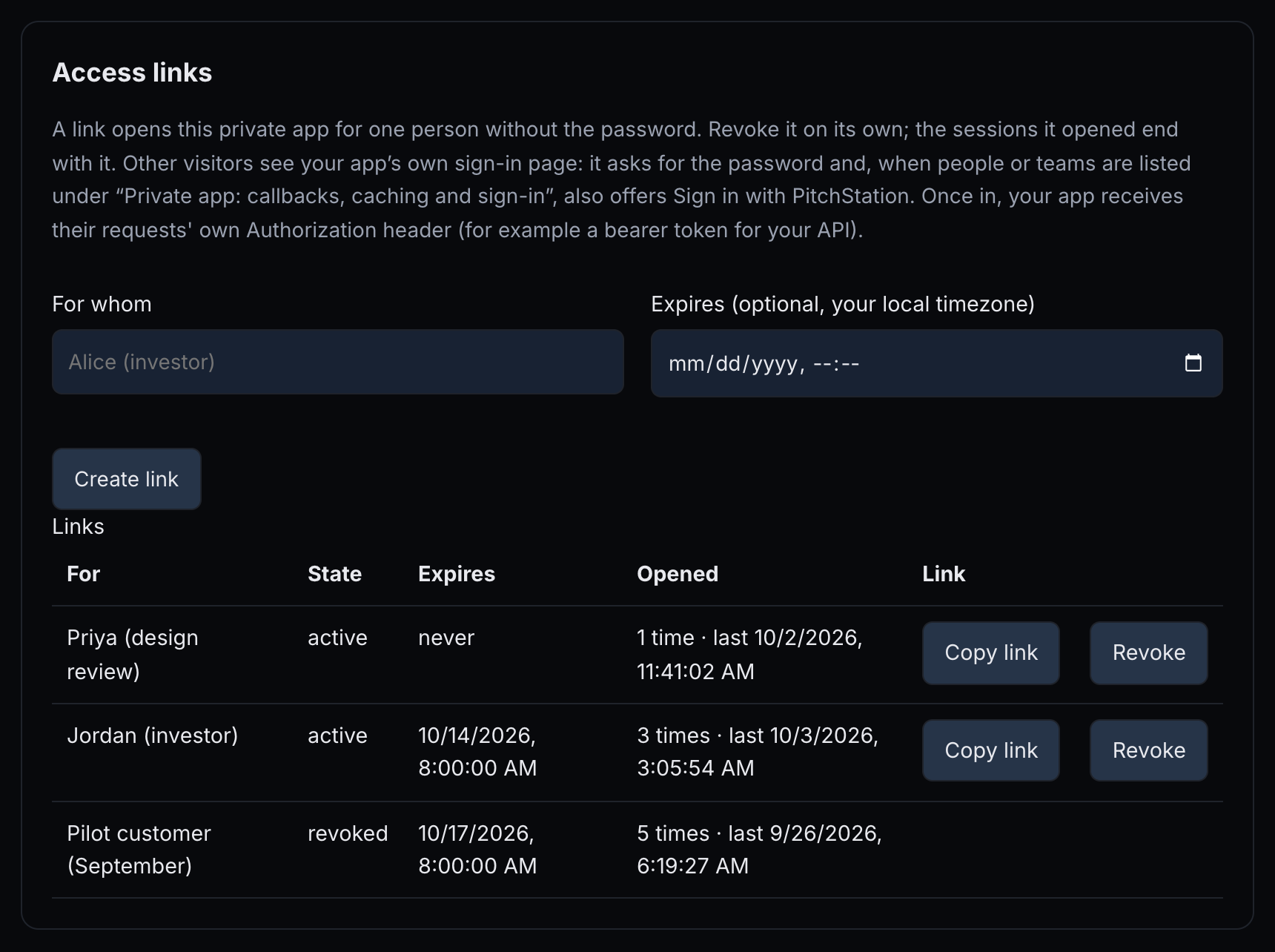 1234567
- For whom — a label you will recognise, for example “Priya (design review)”.
- Expires (optional, your local timezone) — when the link stops working.
- Create link — creates it at once.
- Opened — how often the link was opened and when it was last used — needs host setup.
- Copy link — “Link for … copied. Send it only to them.”
- Revoke — asks “Revoke the link for …? Their session ends too.”
- revoked — a revoked link stays listed with its state.
Sign in with PitchStation
On a private app, list People (up to 50 usernames) and Teams (up to 20, by handle or @owner/handle, teams you can see). They can then open the app with their PitchStation account; you always can.
- Membership is checked at each sign-in. Removing someone takes effect when their session ends, at most 12 hours later. Clearing the list ends every account session at once.
- Only people can sign in, not service accounts. Unknown names are refused at review (
POLICY_INVALID), and the message names them (“Unknown username: …”). - New sign-ins need PitchStation to be reachable.
On the web page, fill the fields, press Review plan, then Apply. The message reads “Applying (operation …). The change is live once the operation succeeds.” Applying re-applies routing: no rebuild, no restart.
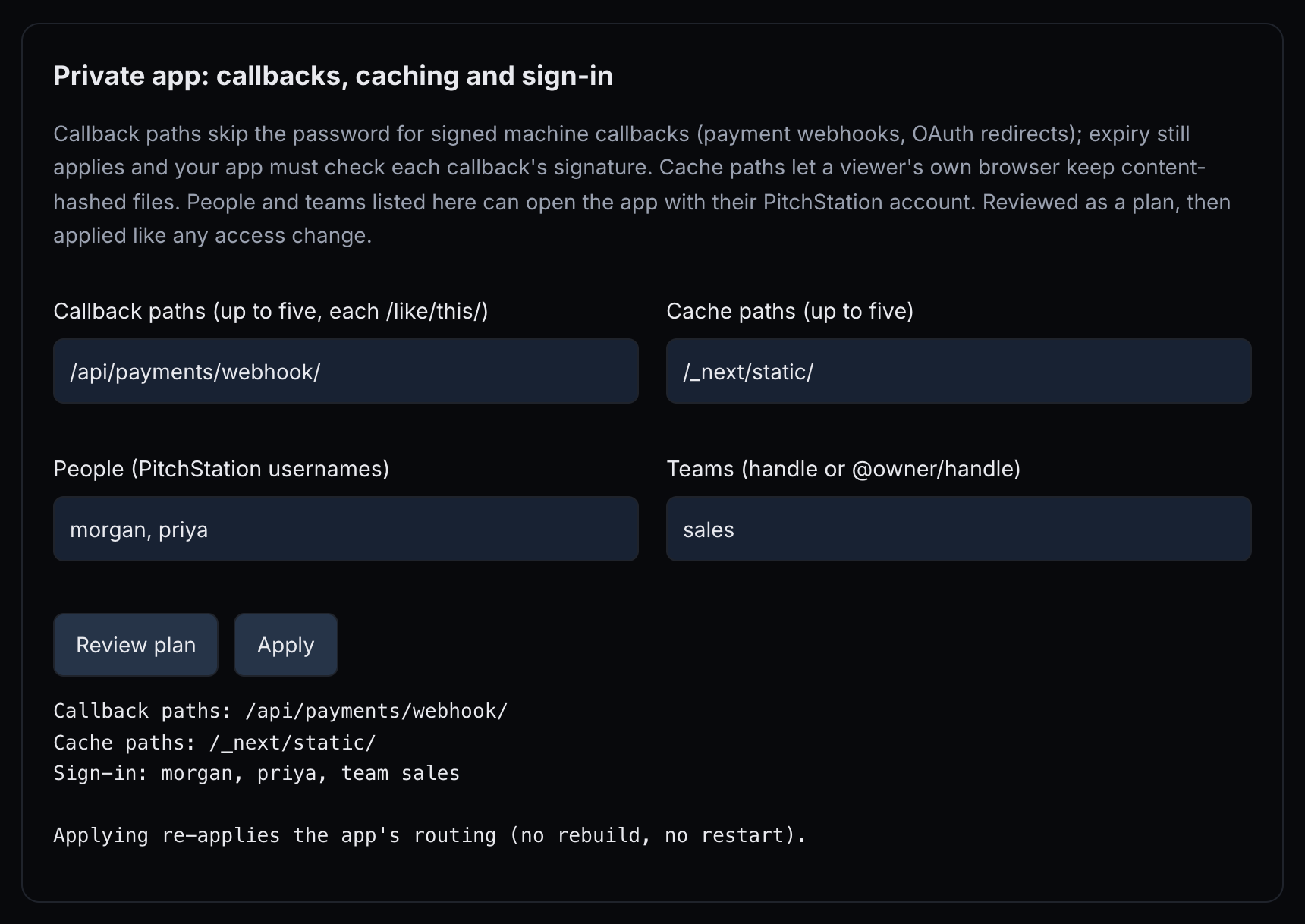 1234567
- Callback paths (up to five, each /like/this/) — served without the password (§06, Callback paths).
- Cache paths (up to five) — files a viewer's browser may keep.
- People (PitchStation usernames) — who may sign in with their account.
- Teams (handle or @owner/handle) — teams whose members may sign in.
- Review plan — shows the change; nothing happens yet.
- Apply — starts the operation.
- Sign-in: morgan, priya, team sales — the reviewed list.
With the client, plan and apply this file as above.
Callback paths for webhooks and OAuth
Up to five path prefixes on a private app are served without the password, for signed machine callbacks such as payment webhooks and OAuth redirects. Each starts and ends with /, for example /api/payments/webhook/; it cannot be / or under /__ps/. Matching is by prefix, so /api/payments/webhook/stripe is covered but /api/payments/webhook is not. The expiry still applies.
Cache paths
A private app is no-store by default. Responses under a cache path, or ones your app marks immutable, may stay in the signed-in viewer's own browser for a year (private, max-age=31536000, immutable). Revoking someone does not remove files already cached on their device, so use this for content-hashed files only.
Expiry and event date
The expiry closes the app on every address and every path, callback paths included: every request answers 410, a plain “410 Gone” page from the host. On a private app, the sign-in page and access links say “This app is no longer available.” The expiry is checked on each request on the host, so it holds even when PitchStation is unreachable. Access links stop too, and readiness reports PUBLICATION_EXPIRED.
Set it when you create the app with ps-apps create … --expires 2026-11-15T23:59:00+08:00, or later in 2 · Access and expiry or a policy plan. Renew it with a later date, or remove it: no rebuild, no restart. Dates need a timezone; the page uses your local time. The event date is for your records and only warns when the expiry comes first. The deploy guide covers the same in Addresses and access, Access links and Private apps.
§07What your visitors see
What the people you share an app with meet, and what to send them. You can send a teammate a link to this section.
- Public app: visitors open the address. If the app has its own login, they see that.
- Private app: browsers see a small page, This app is private: “Enter the password you were given, or open the access link you received.” It has a Password field and an Open button, and Sign in with PitchStation when you listed people or teams. A correct password gives a 12-hour session, never past the expiry. A wrong one shows “That password is not right.” After ten wrong tries in ten minutes from one address: “Too many attempts. Wait ten minutes and try again.”
- Access link: it opens the app straight away for that person, with a session of up to 12 hours. The link itself works again until it is revoked or expires.
- Sign in with PitchStation: visitors who are not signed in to PitchStation sign in first, then come back with a five-minute pass. People not on the list see Not on the list: “Your PitchStation account is not on this app's list. Ask the person who shared the app to add you, or use the password or access link you were given.”
- Scripts and API clients use HTTP Basic with the user
previewand the password. - After sign-in, the visitor's own
Authorizationheader reaches your app, so a bearer-token API works behind the gate. - Private pages carry
X-Robots-Tag: noindex, nofollowand are not cached, apart from cache paths and responses your app marksimmutable(§06). - Closed app: after the expiry, every address and path answers 410 Gone, a plain error page from the host; your app is not reached. On a private app, the sign-in page and access links say “This app is no longer available.” An app an administrator took down answers 404.
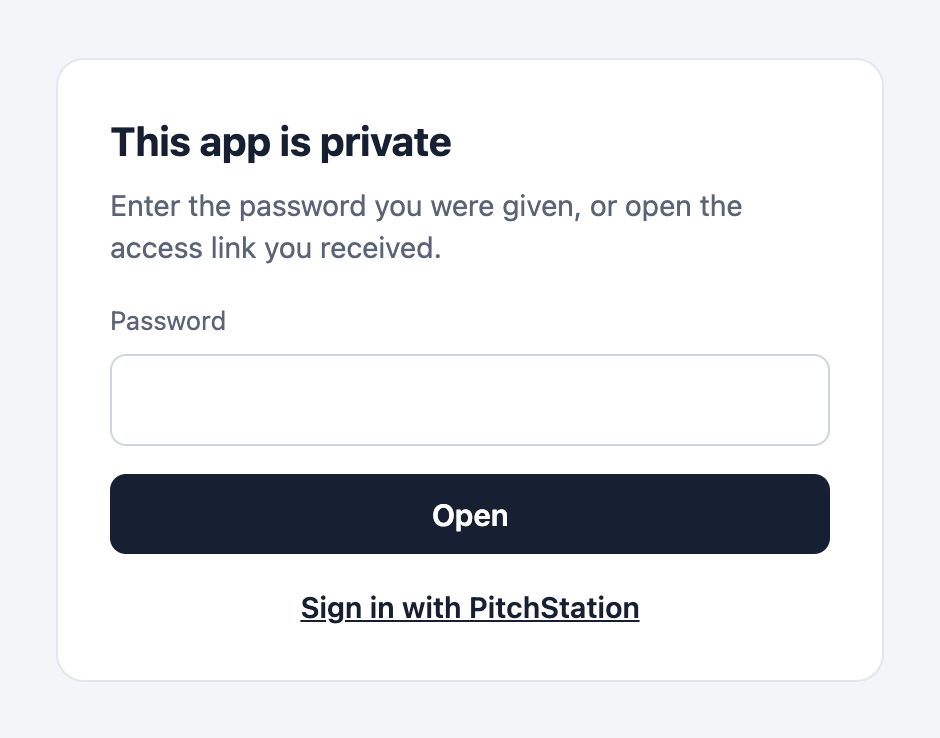
What to send people
- The address.
- The password, separately; or give each person their own access link.
- That a session lasts up to 12 hours.
- For teammates with PitchStation accounts you listed: they can use Sign in with PitchStation.
Report a problem with an app. Anyone can report one at pitchstation.ai/abuse.html, without an account. The reporter's email is never shared with the owner.
§08Settings and secrets
Set environment variables and build-time values, deploy settings and hooks, and read-only services, knowing what each change restarts.
Environment variables
Preview a change first: it lists which keys change and which stay. Applying restarts the current release with the new values, without a rebuild. Unrelated keys are kept, and if the restart fails, the previous env is restored.
Check which keys change and which stay, then apply. Applying restarts the app.
.env file, beside PORT and HOST_PORT. The Compose file the client generates for Vite and Next.js projects passes that file to the container. In your own Compose file, give every service that reads the values env_file: .env, as the deploy guide's scaffold does.- Values are stored encrypted, and the API returns key names only.
- Values of 6 characters or more are masked in logs and step output as
[redacted:KEY]. Shorter values and common words (production,trueand so on) are not, so do not print secrets. - The rules for names and sizes are in §15.
PORT,HOST_PORT,COMPOSE_*andDOCKER_*are reserved. - There is no env control on the web page or in MCP.
Before the first deploy. Until a release has gone live, applying an env change fails with CONFIG_REVIEW_REQUIRED, whose message mentions a legacy app. That also covers a first deploy that failed. Put the values in app.json under "env" when you create the app. If the app already exists, store them with REST: the call replaces the whole stored set, and the next deploy uses it.
The token travels to curl on its input (-H @-, curl 7.55 or newer), so it never appears in the list of running commands.
.env files out anyway.Build-time keys
Frameworks bake some values into the build: NEXT_PUBLIC_*, VITE_*, REACT_APP_*, NUXT_PUBLIC_*, EXPO_PUBLIC_*, GATSBY_* and PUBLIC_*. A restart cannot change them. The env preview lists such keys under buildScopedKeys with rebuildRequired: true; the app then shows a notice until a deploy succeeds. Redeploy to pick the new value up.

The platform writes the release's .env before it builds, so the file is part of the default build context. A framework that reads .env while it builds, as Vite and Next.js do, picks the values up. The client's Vite scaffold, and its Next.js scaffold for an app at the source root, work this way. A Next.js app in a workspace (--app-dir) does not: Next.js reads .env only from the app's own folder. An image archive is built on your machine with your local env: the platform's values never reach it, yet a deploy from it still clears the notice.
.env out of your image. Because the file is in the build context, a Dockerfile of your own that runs COPY . . copies it, with every secret, into the image. Add .env to a .dockerignore, unless the build needs build-time keys; then use a multi-stage build and copy only the build output into the final stage. Runtime values still reach the container through env_file: .env.To mark other keys as build-time, or one of these as runtime, send scopes only; they are stored without a restart, but the client still wants --key with --apply.
${…} inside build: is refused: only ${PORT} and ${HOST_PORT} are allowed in guarded settings.Deploy settings: migration, hooks, Compose file
Preview the settings, then save them; saving needs no key. They apply from the next deploy, and an operation already accepted keeps the settings it was accepted with.
Check the settings as they will be, then save them.
- The migration and each hook run in a new one-off container of the named service (
docker compose run --rm), not inside the running one. Solocalhostin a hook is that one-off container, not your running app: that is why the example warms the cache with a script. - Commands are split into words the way
shdoes. Shell operators outside single quotes are refused (; | & < > ( ) $and backticks); wrap such a command assh -c '…'. A command is one line of up to 2,000 characters and 100 words, and is never shown back. - Pre-deploy hooks (up to 5) run after the images exist and before the migration. A failure stops the deploy like a failed migration.
- Post-deploy hooks (up to 5) run after the health check and only warn.
- Each hook has a timeout of 1–1,800 seconds (default 300).
- Rollbacks and env changes run neither the migration nor the hooks.
- The deploy's dry run (not the settings preview) refuses a hook or migration in a service the Compose file does not define. A Compose file that uses
includeis not checked this way. composeFileis a relative.yamlor.ymlpath inside the project.
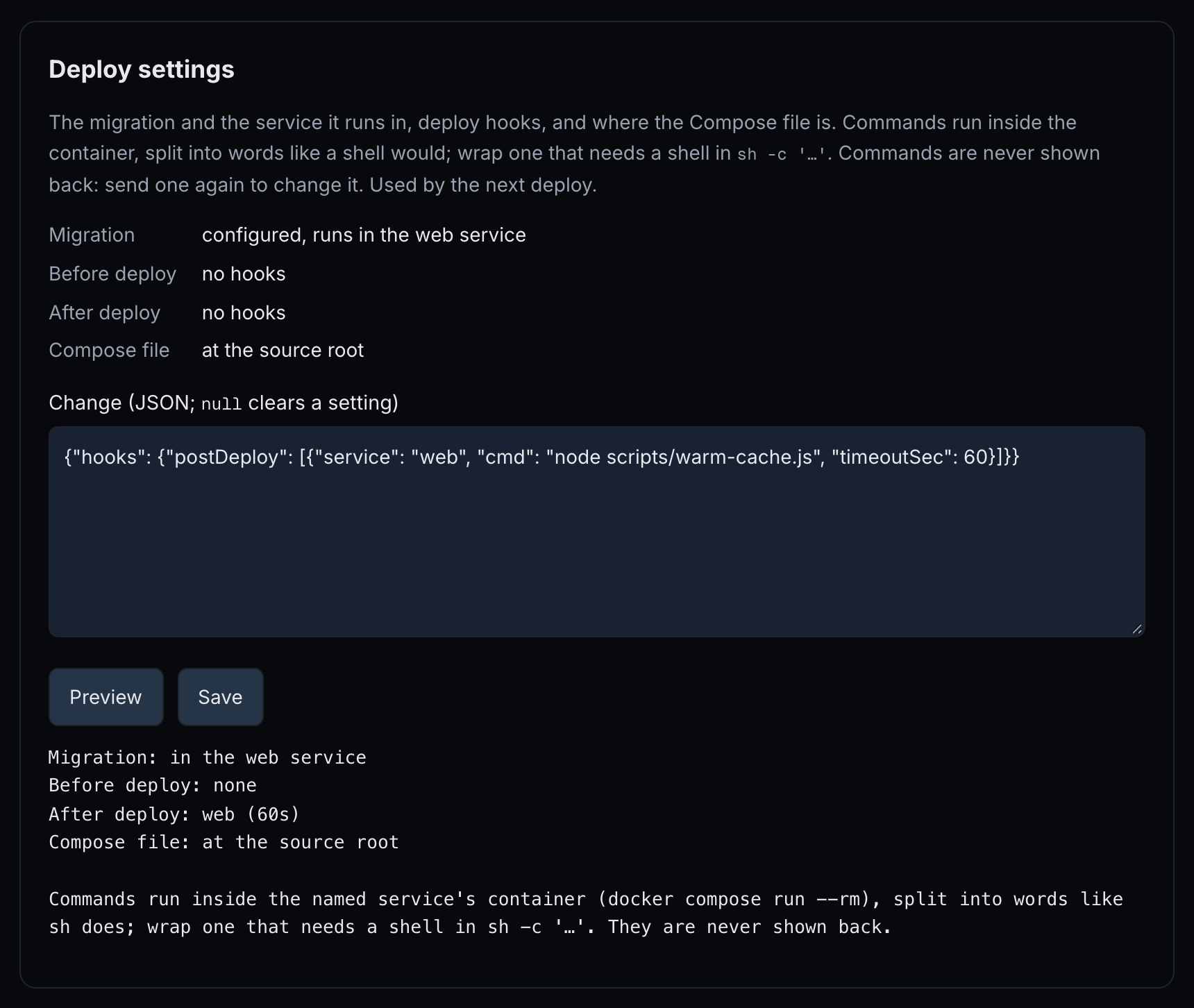 12345
12345- Current settings — the migration service, hooks and Compose file in use.
- Change (JSON; null clears a setting) — only the settings you change.
- Preview — checks the change; nothing is saved yet.
- Save — “Saved. The next deploy uses them.”
- The preview — the settings as they will be.
Read-only services
The services you list (up to 16) run with a read-only root file system and a writable /tmp; keep data in named volumes. The change applies at the next deploy, rollback or env change. On the web page, Save stores the list at once, with no preview; it still takes effect at the next deploy, rollback or env change.
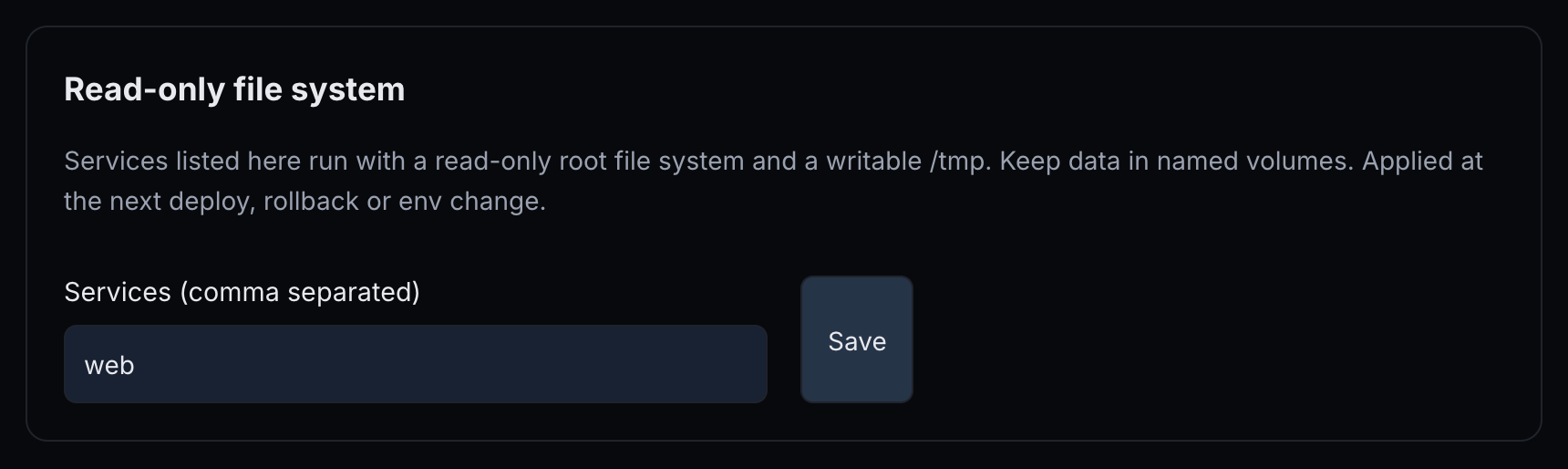 12
12- Services (comma separated) — the services to run read-only.
- Save — stores the list.
What cannot change after creation
The slug, the web service, the container port and the health path are fixed, and so is the name on the Apps page. To change one, create a new app and move your domain to it: detach the name here, then plan it there. The deploy guide covers Environment variables, build-time keys and deploy settings, and the host rules are in Strict hosts, egress and acceptable use.
§09Watching your app
See whether the app is healthy, read its logs, size its budget, prove it is reachable, and know what is recorded.
Container status
On the web page, press Show container status. The table shows Service, State, Health, Restarts, Last exit (“(out of memory)” when the container was killed for memory), Memory, CPU and Started, with the budget line below it. In a terminal, run ps-apps status --app 41. With MCP, pitchstation_app_status also shows pending DNS records, the last 3 operations and readiness.
Status is cached for 15 seconds. Status and log reads together are limited to 10 a minute per person per app (RATE_LIMITED); a cached status answer does not count.
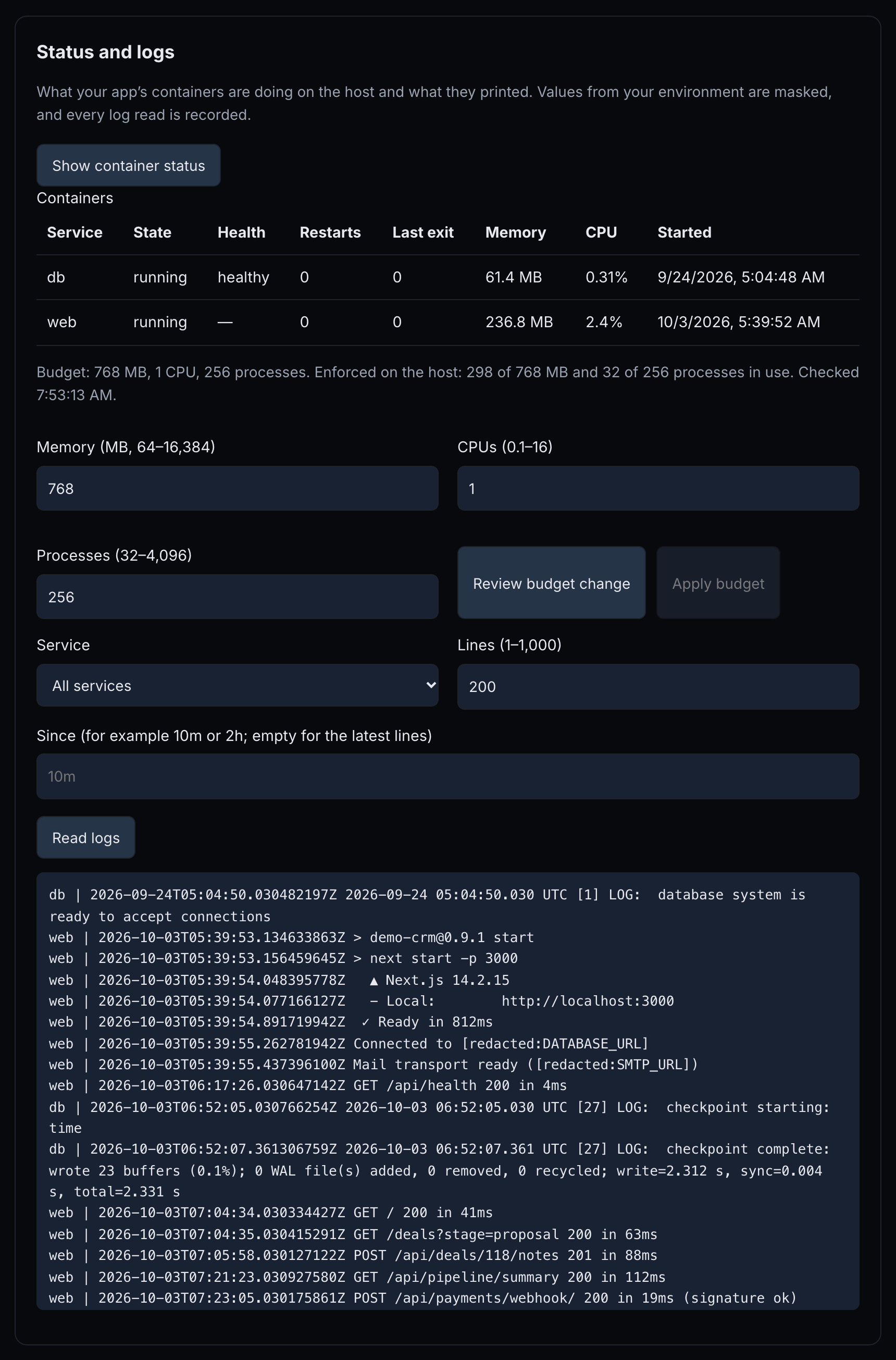 123456789
- Show container status — reads the containers from the host.
- Last exit and Memory — how each container last stopped, and what it uses now.
- Budget: 768 MB, 1 CPU, 256 processes. — the budget, and whether the host enforces it.
- Memory (MB, 64–16,384) — with CPUs and Processes, the new budget.
- Review budget change — a preview; nothing changes yet.
- Apply budget — enabled after a review.
- Service — which service's logs to read; filled once you show the status.
- Read logs — reads the latest lines.
- [redacted:DATABASE_URL] — a masked value from your environment.
Logs
On the web page, press Show container status first, so Service lists your services. Then set Lines (1–1,000) and Since (for example 10m or 2h; empty for the latest lines) and press Read logs. With MCP, use pitchstation_app_logs.
A read returns up to 1,000 lines or 256 KiB. Lines from all services are interleaved by time, and values from your env are masked. Every read is recorded, including reads by administrators.
Resource budget
The default budget is 512 MB, 1 CPU and 256 processes. You can set 64–16,384 MB, 0.1–16 CPUs and 32–4,096 processes. On shared hosts the budget is enforced: an app over its memory is killed inside its own budget, never its neighbours'.
- On the web page, the budget fields show the app's stored budget as soon as you choose the app; a field you leave empty keeps its stored value. Set Memory, CPUs and Processes, press Review budget change (a preview that says whether the budget fits the host, or shows the host's warning when it would not), then Apply budget.
- On a host that enforces budgets, the message reads “Budget change accepted (operation …)”, and the change is live without a restart. On other hosts it reads “Budget 768 MB, 1 CPU, 256 processes. Stored and shown; this host does not enforce budgets yet.”
RESOURCE_ADMISSIONmeans the host has no room for that budget. The message gives the numbers, for example “Requested 4096 MB; 2304 of 3584 MB is already committed on the host, so at most 1280 MB fits.”- On your own isolated host, budgets are stored and only warn, unless the platform is set to enforce them.
Check that the budget fits the host, then apply.
With an assistant: “Raise demo-crm's memory budget to 768 MB. Show me the preview first.”
Readiness: proof the address works
Press Check readiness, run ps-apps readiness --app 41, or use pitchstation_app_readiness. Every deploy, rollback and configuration operation also runs it at the end.
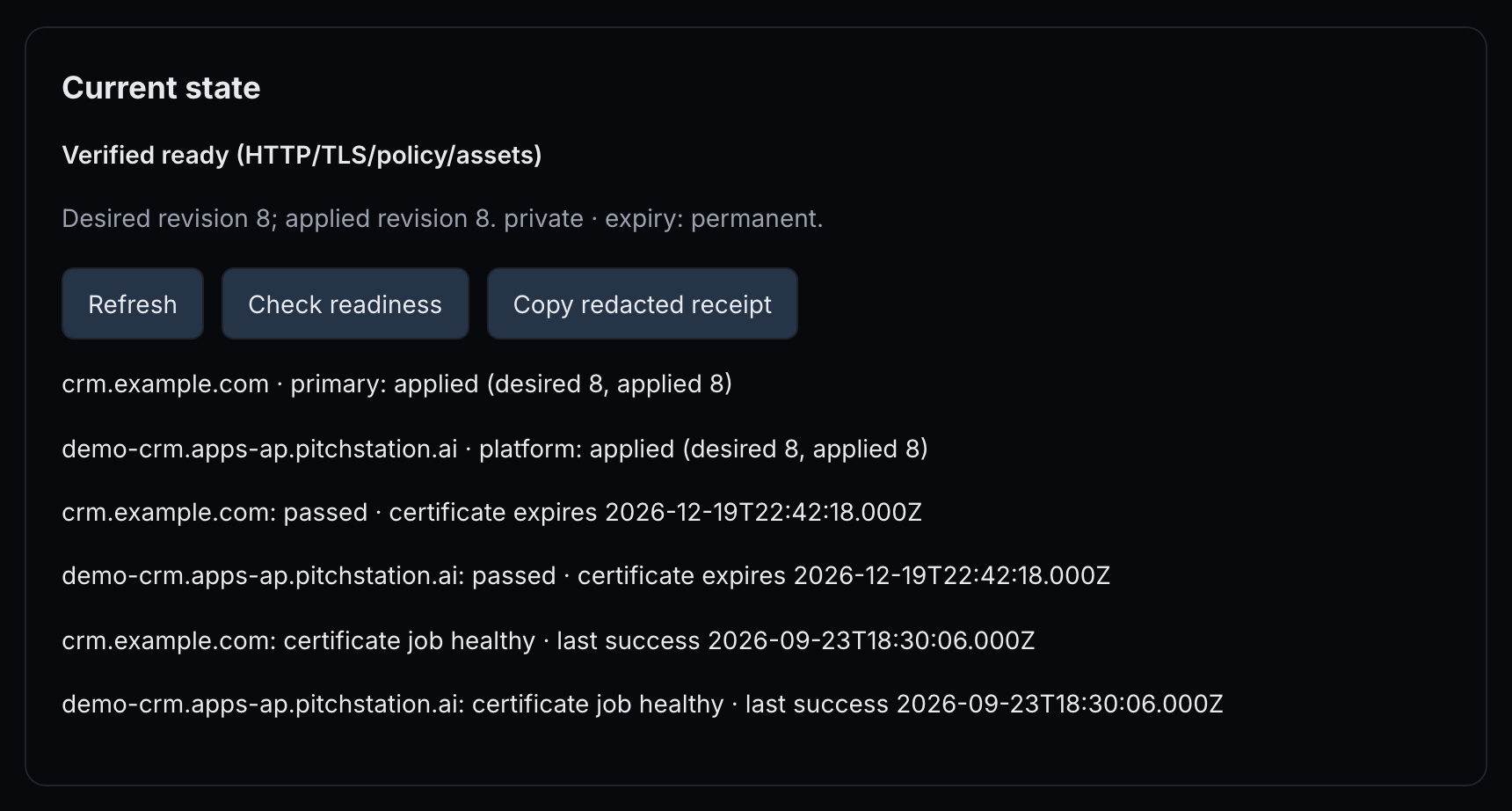 1234567
- Verified ready (HTTP/TLS/policy/assets) — the headline (table below).
- Desired revision 8; applied revision 8. — the configuration you asked for, and what the host runs; then access and expiry.
- Refresh — reloads the configuration, plans, readiness and operations.
- Check readiness — runs the checks now.
- Copy redacted receipt — copies a summary without passwords.
- crm.example.com · primary: applied … — each hostname's routing state.
- crm.example.com: passed · certificate expires … — each hostname's readiness and certificate.
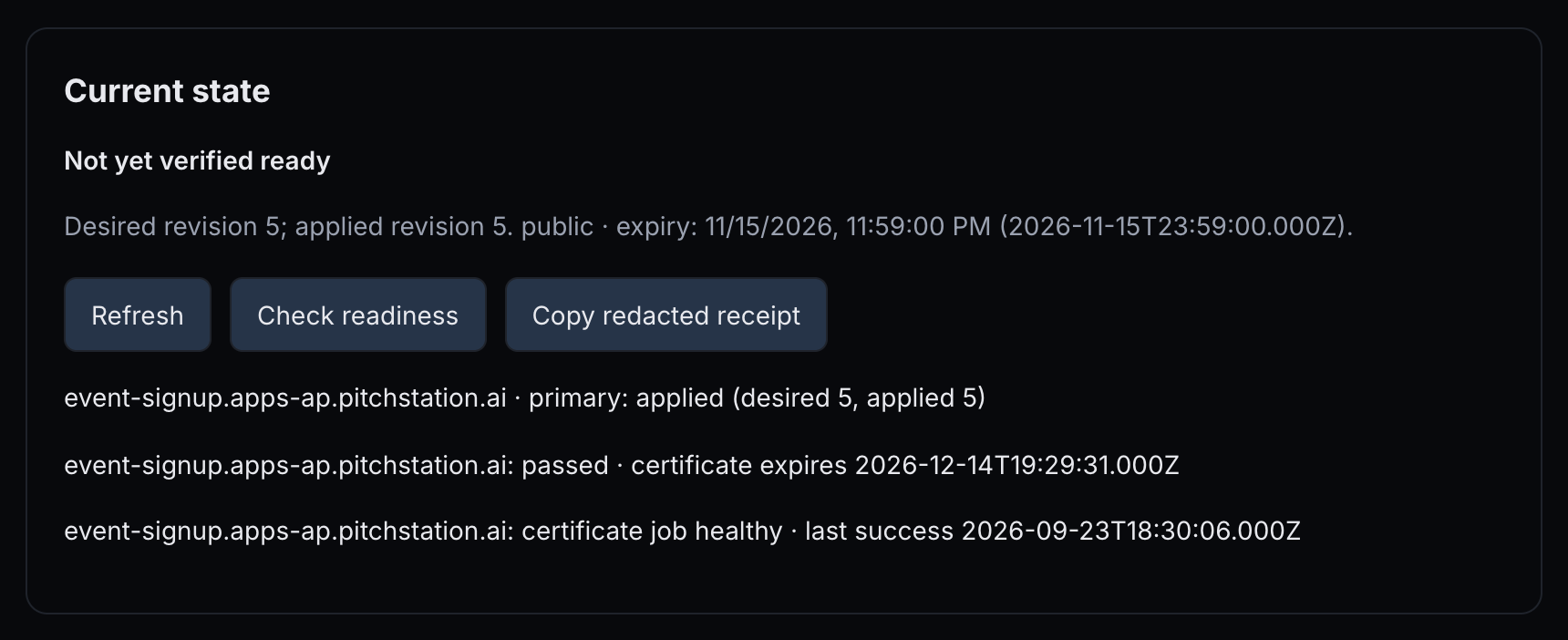 12
12- Not yet verified ready — no recent passing check (table below).
- expiry: … — in your local time, then in UTC.
| Headline in Current state | Means |
|---|---|
| Verified ready (HTTP/TLS/policy/assets) | A passing check, less than five minutes old, for the current configuration and release. |
| Not yet verified ready | No such check: none yet, older than five minutes, something changed since, or the last deploy failed. |
| Publication expired | The expiry has passed; every address answers 410 (§06). |
| Inventory required | An app from before managed publishing; an administrator must take stock of it first. |
| Check, per hostname | Passes when |
|---|---|
| DNS | The name resolves to the host from all three resolvers, and a custom name has its TXT proof. |
| TLS | The certificate is valid for the name. |
| Access | Private: anonymous visitors are asked to sign in. Public: anonymous visitors are not refused, and you declared no separate restrictions. |
| Redirects | A redirect alias answers 308 to the primary; a disabled platform address answers 404. |
| Identity | The home page answers 200 and contains your marker, and the platform's headers name this app and its current release. |
| Assets | Scripts and stylesheets on the page (the first 12) and up to 16 critical assets answer 200 with real content; assets on other sites are listed, not fetched. |
| Not checked | Interactive behaviour: logins, video, 3D, language switching, payments. |
- A result is valid for five minutes. Check readiness within 30 seconds of the last check returns that result.
- The result goes stale when the configuration, the release or the app's running state changes.
- After a failed deploy, the headline stays Not yet verified ready until a deploy or rollback succeeds, even if the previous release still serves.
The deploy guide's checklist Before you announce it lists what to try by hand.
Receipt
Copy redacted receipt (“Copied. No passwords were included.”) or ps-apps receipt --app 41 gives the app id, URLs, policy summary, revisions, release, latest readiness and last operation id, never a password.
Access-link use
The Opened column of Access links shows how often each link was opened and when it was last used — needs host setup. The host reports this every five minutes, link ids and times only. On a host whose reporter has not been updated by onboarding, it keeps showing “not yet”.
What is recorded
The last 50 events of each app are in ps-apps show --app 41: plans, applies, operations, log reads, moves, backups, sign-ins with PitchStation and takedowns. Each event has its name, revision, operation id, who and when. The deploy guide's Operate table lists the same tasks by channel.
§10When something goes wrong
Follow an operation, retry or cancel it, resolve an uncertain one, roll back without falling into the health-check trap, and stop or delete an app.
A deploy failed: what to do first
On the web page, open the newest operation in Operations and recovery. In a terminal, read the operation once with ps-apps operation --app 41 --operation ID (box below). The failed step's output sits under it.
none or artifacts_retained: nothing is uncertain. reconciliation_required: resolve that first (Resolve an uncertain outcome, below).
health: see After a failed health check, below. migrate or pre-deploy-N: the outcome is uncertain, below. compose-policy: the error lists the refused settings; §15 has the rules. build: read the output, or see BUILD_LIMIT_EXCEEDED in §04, The build ceiling. DNS or TLS codes: §05 and §11.
Retry only for a passing cause (DNS now fixed, a host that was unreachable, a slow start), and only the newest operation. Otherwise fix the cause and deploy with a new key.
Run ps-apps status and ps-apps readiness. After a failed deploy the headline stays Not yet verified ready until a deploy or rollback succeeds (§09).
Operations
Every applied change becomes an operation with an id: deploys, rollbacks, env, domains, access, links, budget, backups and restores. Operations run one at a time per app; while one is active, other changes answer OPERATION_BUSY.
States: queued, running, then succeeded, or failed or cancelled. An operation can also wait in waiting_external (usually for DNS) or be cancel_requested.
- On the web page, Operations and recovery lists the latest 30, newest first. Each shows its action and status (and its phase while it runs), when it was accepted and when it finished (for an operation you reconciled, when you reconciled it), its id and cleanup state, any error as “CODE — who: what to do”, and the numbered steps. A failed step's last lines open under “Output of STEP (last lines, secrets masked)” and are kept 30 days. The panel refreshes every 3 seconds while an operation is active.
- In a terminal,
ps-apps operation … --watchfollows an operation for up to 5 minutes; its exit code is 1 when the operation failed or was cancelled. With MCP, usepitchstation_app_operation. - Find the operation id. The apply prints it (
"operation":{"id":…}),ps-apps show --app 41lists the app's recent operations, and the web panel shows it on each. - Read a failed step from the terminal. Read the operation once, without
--watch. Each step has astatus, and a failed one anerrorwhoseoutputholds its last lines (about 60 lines or 8 KiB at most, secrets masked).cleanupStateandreconcilesay what comes next.
The error line names who acts by default, so “operator” also appears on failures you fix yourself, such as a failed health check. Read the step output first.
Retry
Retry safe steps, ps-apps retry or MCP's action: "retry" continue the same operation and skip the steps that already succeeded. Retry works for a failed or waiting operation whose error is retryable, that needs no reconciliation, and whose configuration has not changed since. Use it for passing causes: DNS now fixed, a host that was unreachable, a slow start. After a code or configuration fix, deploy again with a new key. TLS_RATE_LIMITED refuses retries for 60 minutes. On the web page, Retry safe steps appears only on a failed operation: one that waits in waiting_external tries again by itself, within about 15 minutes, and ps-apps retry tries it now.
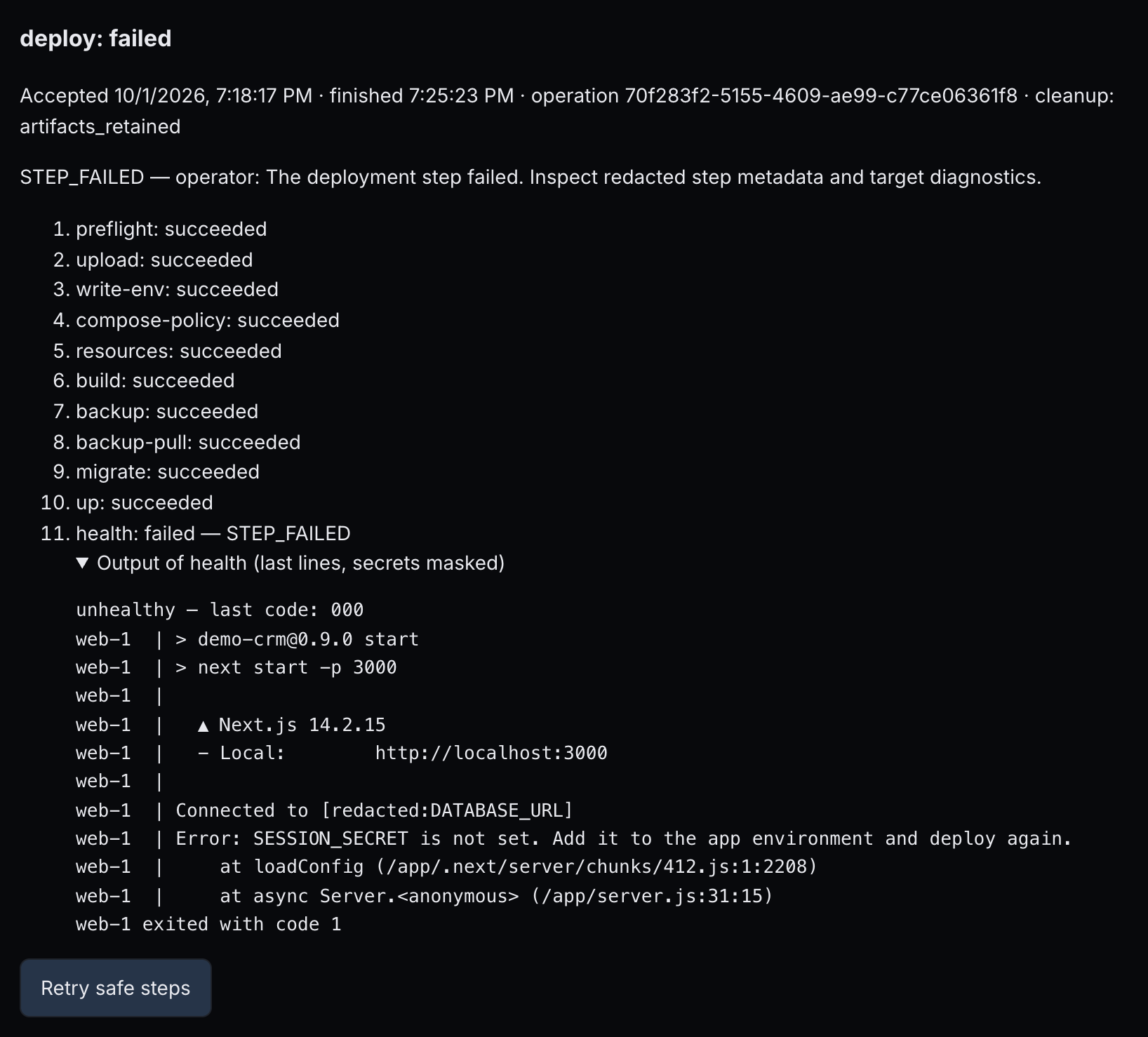 123456
- deploy: failed — the action and its status.
- cleanup: artifacts_retained — nothing is uncertain; the release's files are kept.
- STEP_FAILED — operator: … — the error line; read the output before you act on “operator”.
- health: failed — STEP_FAILED — the step that stopped the deploy.
- Output of health (last lines, secrets masked) — what the step printed.
- Retry safe steps — runs the failed steps again; use it only for passing causes.
Cancel
Request cancellation, ps-apps cancel or MCP's action: "cancel" stops the operation at the next safe checkpoint. Afterwards, check status and readiness before you deploy again.
Resolve an uncertain outcome
Some failures leave the platform unsure what happened on the host:
- a migration or pre-deploy hook that exited non-zero;
upor activate that failed, or an env restart whose previous env could not be restored;- a failed restore;
- a step that timed out;
- a dropped connection.
An env restart that fails but restores the previous env is not uncertain: it reports ROUTE_APPLY_FAILED (§11), and the app runs as before.
The operation then shows “cleanup: reconciliation_required”, and every new change answers RECONCILIATION_REQUIRED until someone resolves it. Who resolves it is in the notice under the operation, and in reconcile.by when you read the operation in a terminal, not in the error line: that line reads “RECONCILIATION_REQUIRED — operator: …” even when you can resolve it yourself.
You resolve it when only your containers were involved: the migration, up, the health check, activate, an env restart or a hook.
Press Inspect the host. It is read-only: it pauses only this app's queue of operations, and the app keeps serving.
Find out whether the migration ran, partly ran or did not run.
Tick I checked the database: any migration this operation ran is either complete or handled. and write What you found, at least 8 characters; it is recorded.
Press Confirm and unblock within 15 minutes of the inspection.
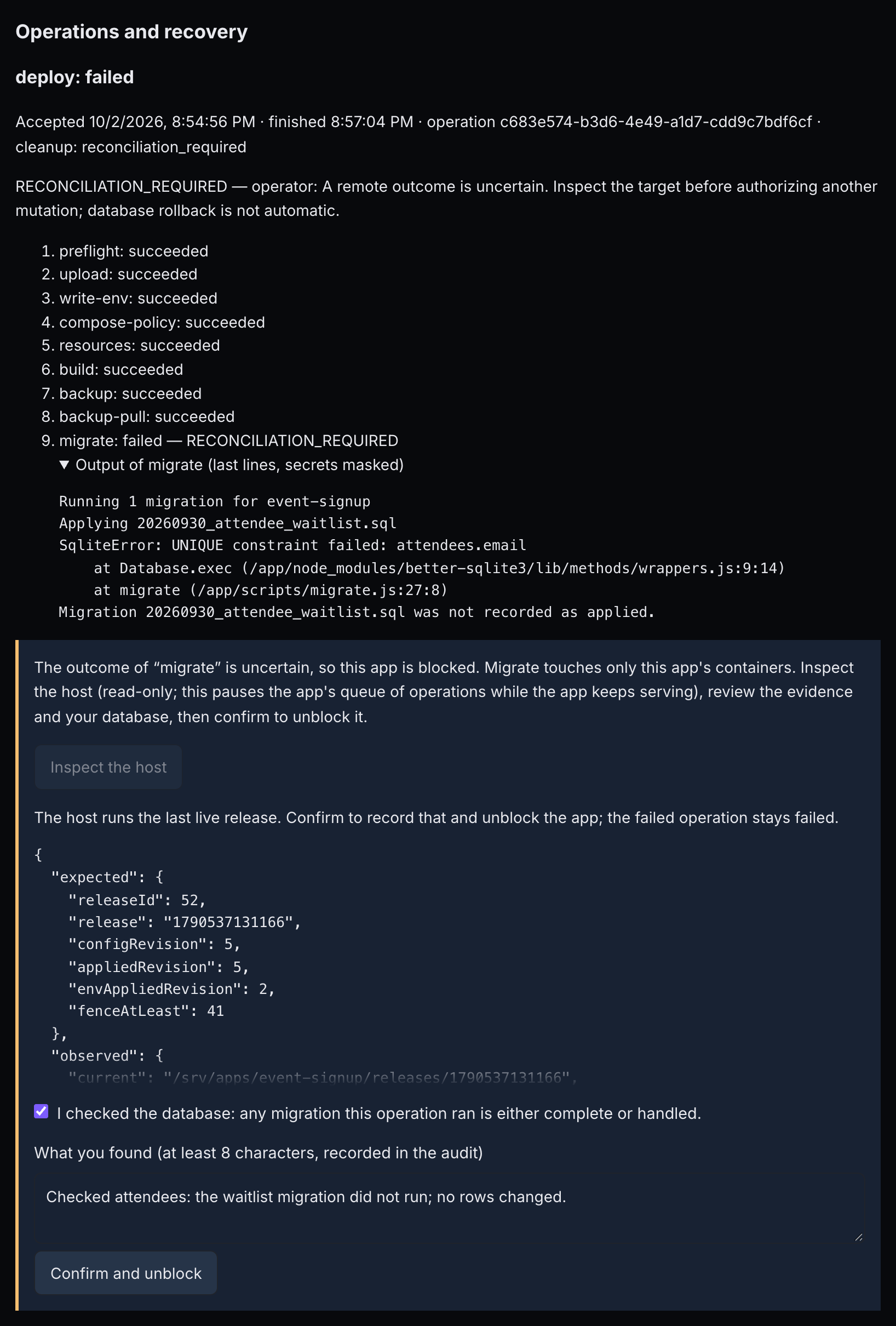 12345678
- migrate: failed — RECONCILIATION_REQUIRED — the uncertain step.
- Output of migrate (last lines, secrets masked) — what the migration printed.
- The outcome of “migrate” is uncertain, so this app is blocked. — the notice says who resolves it.
- Inspect the host — reads the host; the app keeps serving.
- Evidence — what runs on the host now, for example which release.
- I checked the database: any migration this operation ran is either complete or handled. — your confirmation.
- What you found (at least 8 characters, recorded in the audit) — your note.
- Confirm and unblock — records it and unblocks the app.
Read the evidence and check your database, then confirm within 15 minutes with the inspectionId it printed:
With an assistant: “The last deploy of demo-crm failed. Show me the failed step and its output. If the operation says reconcile.by is "owner", inspect with the reconcile command and summarise what you find, then wait for me before recording anything.”
- Afterwards the failed operation stays failed. Deploy or roll back with a new key; migrations are not undone.
- Read the inspection before you choose. When it reports that the host still runs the last live release (on the page, “The host runs the last live release…”), confirming is enough: deploy the fix with a new key, and do not roll back, because a plain rollback would go one release further back.
- An administrator resolves it when routing, certificates, a restore or a quarantined host (a step that timed out or lost its connection) were involved: the page says “This needs an operator: …”. Trying yourself gives
RECONCILE_NOT_ALLOWED. A migration that times out (15 minutes) also goes to an administrator; one that exits non-zero goes to you.
Roll back
A rollback recreates a kept release with a few seconds of downtime. It keeps the current domains, access, budget and last applied env, and runs no migration and no hooks. Without --release it goes to the newest healthy release other than the current one. Normally that is the previous release; after a rollback, it is the newer release you rolled back from. Check the release the preview names in to (its releaseTs in ps-apps releases), or name the release. Rollback is not on the web page or in MCP.
To roll back to a named release, list the releases, preview the rollback to the one you want, then apply it:
Only the boxes with --apply act. The two applies need different keys: they are different requests, so reusing one key answers IDEMPOTENCY_KEY_REUSED. The preview warns “Code rollback does not undo database migrations”.
build: an image: tag that changes with each release, for example image: demo-crm-web:2026-10-02-1. Image archive deploys need image: tags anyway; change those with each release too.--release goes to the one before it. To return to the last good release, name it: ps-apps releases --app 41 marks it as the live one.After a failed health check
up replaced the containers before the health check failed, so visitors reach release 119, or an error, until you act.
- If the app was only slow to start, press Retry safe steps or run
ps-apps retry: the health check runs again. - Otherwise fix the cause (listen on 0.0.0.0; a health path that answers 200 without a login or redirect) and deploy with a new key. This is the reliable way back.
- To roll back instead, name the last good release:
ps-apps releases --app 41shows it aslive, then run the named rollback above. A plain rollback skips it, and a rollback restores code only when each release's built images carry their own tag.
If the output shows a missing setting, as in the screenshot under Retry, set it with ps-apps env (§08) and deploy again with a new key. If the failed deploy was the app's first, ps-apps env answers CONFIG_REVIEW_REQUIRED: store the setting with REST (§08, Before the first deploy), then deploy. This failure is not uncertain: the cleanup state reads artifacts_retained.
Stop or delete an app
Stopping and deleting are done by REST, or by your assistant (“Stop demo-crm, then delete it. Keep its data volume.”). Load the token into one shell first.
The token travels to curl on its input (-H @-), never on its command line. Once the stop has succeeded, delete:
- Stop keeps volumes and releases. There is no start command: a deploy, or a rollback that names the current release, brings the app back.
- Delete removes the app's containers, routing and budget from its host and releases its addresses. The app must be stopped first (otherwise
APP_RUNNING), unless it was never deployed. Data volumes are kept; on a shared host an administrator removes them. - Without
?removeFromHost=1, a delete on your own host only forgets the app in PitchStation: its containers keep running and its addresses stay reserved for good. On a shared host the app is always removed. - No operation may be running, and a stopped copy left by a move must be removed first (
ps-apps moves --app 41 --remove-source MOVE_ID).
?removeFromHost=1, the app's addresses are released. A plain delete on your own host keeps every address reserved for good: nothing releases them later, and even the same slug cannot be created again (DOMAIN_ALREADY_BOUND). Data volumes stay on the host.The deploy guide's Operate and Troubleshooting sections and the API reference's Operations cover the same ground.
§11Error codes and fixes
Turn any code into a next step. Each channel shows an error a little differently:
- Apps client: one JSON line on stderr,
{"schemaVersion":1,"success":false,"error":"CODE: message …"}, and exit code 1. The message ends with what the server returned beyond its sentence: the fields or Compose settings to fix, the reason, the hosts placement refused, a missing scope and a correlation id. The same details follow as JSON keys. - MCP:
Error: CODE: message …, with the same details. - Web page: the status message at the top, starting with the code.
- REST: the full JSON, including
fields(names to fix, never values),detail,retryableandactor.
actor is publisher (you) or operator (the people who run the hosts). The API reference lists each code's HTTP status, whether it can be retried, and its actor: Errors.
Domains, DNS and certificates
| Code | What it means | What to do |
|---|---|---|
DOMAIN_INVALID | An address is not a plain hostname (no https://, port, path, * or IP), or a domain limit was hit: over 10 names, a name listed twice, detaching a name that is not attached, a reserved name, redirecting or disabling the platform address while it is the primary, or 20 names already held. The message is the same for every case. | Fix domains.json or 1 · Domains and plan again. |
DOMAIN_ALREADY_BOUND | Another app or a PitchStation website holds the name. | Detach it there, wait for an unverified claim to lapse (24 hours), or pick another name. |
OWNERSHIP_UNVERIFIED | The TXT record _pitchstation.HOSTNAME with this app's value is missing for at least one resolver, or was removed. | Add it exactly as shown, press Verify DNS and ownership, and keep it. |
DNS_TARGET_MISMATCH | The name points elsewhere: an old server, an extra A record, a CDN or a proxy. | Make the A record the value shown (or a CNAME to the platform address), remove the others, and verify again. |
DNS_PROPAGATING | The resolvers disagree or have no answer yet. | Wait (TTL 300 is suggested) and verify again; running operations wait by themselves. |
DNS_IPV6_CONFLICT | An AAAA record points somewhere else. | Delete it and verify again. |
TLS_VALIDATION_FAILED | No trusted certificate could be issued: CAA does not allow letsencrypt.org, or port 80 does not reach the host. | Allow letsencrypt.org, point the name straight at the host, and retry once. Then give the code and operation id to an administrator. |
TLS_RATE_LIMITED | The certificate issuer is limiting this name; retries are refused for 60 minutes. | Wait an hour, then retry. Do not plan again in a loop. |
ROUTE_APPLY_FAILED | New routing could not be installed; the old routing was put back. On an env change: the app did not start with the new values, and the previous env was put back, so the app runs as before. | After an env change, read the output of restart-env, fix the value, and apply a new env change with a new key (a retry sends the same values). Otherwise retry once; if it repeats, report the operation id. |
PROBE_BLOCKED | A check refused an address that is not the host's, or a redirect or asset leaves your app's own https names. | Keep redirects and assets on your own https names; otherwise ask an administrator. |
Readiness and access
| Code | What it means | What to do |
|---|---|---|
ACCESS_POLICY_MISMATCH | With fields: ["applicationPolicy"]: a public app not declared to have no separate restrictions. Without fields: the page shows a login form or a server default page, or the gate answered unlike the policy. | If it is true, declare I confirm the application has no separate restrictions (or "applicationPolicy": "none") and check readiness again. An app with its own login: declare it restricted and check in a browser. |
PUBLIC_CONTENT_MISMATCH | Readiness cannot prove the address serves this app: no marker, the marker missing, the home page not 200, an asset that failed or returned HTML, a bad redirect, or the check ran out of time. At deploy: a marker under 12 or over 256 characters, or over 16 assets. | Deploy with a marker or set Expected page identity, fix the asset, and check again. |
PUBLICATION_EXPIRED | The expiry passed; every address answers 410. | Set a later expiry or remove it (§06). |
POLICY_INVALID | An access setting was refused: the password length, no password for a private app, a date without a timezone, a bad value, a link on a public app, over 50 links, a link expiry in the past or over a year away, a bad callback or cache path, unknown people or teams, or people or teams on a public app. | Fix that setting and plan again. |
Plans, versions and keys
| Code | What it means | What to do |
|---|---|---|
CONFIG_VERSION_CONFLICT | The configuration changed after your review. | Plan again and apply the new plan. On the page, press Refresh first, or reload the page. |
PRECONDITION_REQUIRED | A REST change came without If-Match. | Send the ETag; the client and the page do it for you. |
PLAN_EXPIRED | More than 15 minutes passed between plan and apply. | Plan again and apply within 15 minutes. |
IDEMPOTENCY_KEY_REUSED | The key was used for a different request. | To resume, repeat exactly the same command. For a new intent, use a new key. |
IDEMPOTENCY_KEY_REQUIRED | No key, or not 8–128 letters, digits, ., _ or -. | Add one, for example --key release-20261002-01. |
Operations and recovery
| Code | What it means | What to do |
|---|---|---|
OPERATION_BUSY | Another operation for this app is queued, running, waiting for DNS or being cancelled, or the host is busy. | Follow it or cancel it (§10), then repeat with the same key. |
OPERATION_NOT_RETRYABLE | It cannot be retried: it has not failed, it needs reconciling, or the error is not retryable. | Reconcile if asked; otherwise fix the cause and deploy with a new key. |
OPERATION_CANCELLED | Your cancellation took effect. | Check status and readiness; deploy again if needed. |
RECONCILIATION_REQUIRED | The outcome on the host is uncertain, and every change waits. | Follow reconcile.by: you inspect and confirm, or an administrator resolves it (§10). |
RECONCILE_NOT_ALLOWED | The uncertain step reaches beyond your containers: routing, certificates, a restore, or a quarantined host. | An administrator resolves it. |
INSPECTION_EXPIRED | The inspection is over 15 minutes old, already used, or for another operation. | Inspect again, and confirm within 15 minutes. |
ATTESTATION_REQUIRED | You confirmed without the database check, or without a note of 8–1,000 characters. | Tick the box and write what you found. |
STEP_FAILED | A step failed with a known outcome (a build error, health never 200, no Docker), or a status or log read failed. | Read the step output. Fix the cause and deploy with a new key, or use Retry safe steps for a passing cause. |
TARGET_UNREACHABLE | PitchStation could not reach the host; nothing changed. | Retry later, and tell an administrator if it persists. |
TARGET_FENCED | A newer publishing process took the host; nothing changed. | Retry. |
Upload and environment
| Code | What it means | What to do |
|---|---|---|
SOURCE_INVALID | The upload was refused: too large, too many files, a link, a private key, an excluded path, a local database folder, an unsafe or duplicate path, or empty. The error names the reason and the path. | Remove or move that entry, or list it in .pitchstationignore. ps-apps package shows what would be packed. |
SOURCE_ROOT_REQUIRED | A server-side source folder outside the allowed ones (an operator feature). | Upload from the client instead. |
INTAKE_FAILED | An unexpected server error while reading the upload; nothing was accepted. | Retry once, and report the correlation id if it repeats. |
ENV_INVALID | An env change was refused: a bad or reserved key, a multi-line value, too long, too many, too big, a key set and unset at once, or a bad scope. | Fix it and preview again. |
SECRET_UNAVAILABLE | The server cannot decrypt stored settings; nothing changed. | Tell an administrator. |
Hosts, placement, budgets and quota
| Code | What it means | What to do |
|---|---|---|
CONFIG_REVIEW_REQUIRED | A legacy app an administrator has not taken stock of; or an env change for an app that has never had a live release (the message wrongly mentions a legacy app). | Ask an administrator; or set env at creation, or store it by REST before the first deploy (§08). |
ADAPTER_UNSUPPORTED | This host or project cannot do what you asked: managed domains or access on an unsupported host, an image archive for an app not on the managed route, or a project the client cannot package. | Add a Compose file, use another host, or ask an administrator. |
LIVE_DISABLED | Live publishing is switched off on this server; dry runs work. | Ask an administrator. |
HOST_NOT_APPROVED | The app's host, or a move's destination, is not approved for live changes. | Ask an administrator to check and approve it. |
HOST_ONBOARDING_REFUSED | For administrators only: onboarding a host would affect sites it already serves. | — |
COMPOSE_POLICY_VIOLATION | The Compose file uses a forbidden setting. It is refused on shared and strict hosts and a warning on your own standard host. The error lists each refused setting. | Remove those settings (§15, Rules). |
RESOURCES_INVALID | A budget out of range, or an unknown arch or placement key. | Use 64–16,384 MB, 0.1–16 CPUs and 32–4,096 processes. |
RESOURCE_ADMISSION | The memory budget does not fit what is left on the host. | Lower it, or choose another host; targets shows free memory. |
RESOURCES_UNSUPPORTED | The host must enforce budgets but cannot. | An administrator runs the host check. |
HOST_FULL | No free app slot on that host. | Choose another host, or remove an app. |
PLACEMENT_UNAVAILABLE | No host fits. The error lists each host's reason (arch-mismatch, full, quota, no-headroom and so on). | Another region or CPU type, a smaller budget, or ask an administrator. |
QUOTA_EXCEEDED | You have your limit of apps on shared hosts (3 by default). | Delete one (stop it first, §10), ask for a higher quota, or use your own host. |
APP_RUNNING | You tried to delete an app on a shared host that is not stopped. | Stop it first (§10). |
COST_CAP | An isolated host would take your monthly commitment over your cap. | Choose a smaller size, check ps-apps spend, or ask an administrator. |
HOST_STATE_CONFLICT | The host or move is not in a state that allows this: releasing a host that still has apps, deleting an app whose move left a copy, or removing the running release's archive. | Move or delete the apps, remove the move's old copy, or keep that archive. |
Moves, backups, terms and reports
| Code | What it means | What to do |
|---|---|---|
MOVE_UNSUPPORTED | No running release; data over 512 MB; both hosts share one name without per-app DNS; or the release's image archive is gone. | Deploy (or redeploy) first, reduce the data, or ask an administrator. |
MOVE_IN_PROGRESS | A move is running, and changes wait. | Follow it with ps-apps moves; abort one that was interrupted or is still queued (ps-apps moves --app 41 --abort MOVE_ID). |
BACKUP_NOT_CONFIGURED | A backup, restore or move without a backup setup, or a command restore without its restore command. | Set up backups (§13). An app with no data moves with --stateless. |
BACKUP_FAILED | The backup produced nothing usable. During a deploy, nothing after it ran (hooks, migration, start), so the running containers were not changed; the new build is already on the host, though (§04). | Read the step output, fix the backup settings, and deploy again, before any env change: an env change would start the new build. |
RESTORE_REVIEW_REQUIRED | The restore review is missing or stale, or the historical backup has no recorded recipe. | Review the restore dry run and pass plan.review with --review. Download backups without recipes for manual recovery. |
RESTORE_CONFIRMATION_REQUIRED | A restore without the slug as confirmation. | Add --confirm SLUG, or type the slug when the page asks. |
APP_TAKEN_DOWN | An administrator took the app down; it answers 404 and your changes are refused. | Contact the platform administrators. |
TERMS_REQUIRED | Your platform requires the publisher terms and you have not accepted this version. | Press I accept these terms on the Apps page, signed in. |
REPORT_INVALID | The public report form is missing fields or has invalid ones. | Fill them in at /abuse.html. |
Requests and lookups
| Code | What it means | What to do |
|---|---|---|
NOT_FOUND | No such app, plan, operation, backup, move, link or archive for your account; a release that is not this app's; or any publishing change while the server's publishing switch is off. | Check the ids with ps-apps list and ps-apps show. |
QUERY_INVALID | A field is unknown or malformed: the logs service, line count or time, unknown keys in a move, backup, settings or hardening body, a rollback release, or an archive id. The message mentions only logs. | Fix the named field. |
RATE_LIMITED | Over 10 status or log reads a minute by one person for one app (a cached status answer does not count), or over 5 abuse reports in 10 minutes from one address. | Wait the seconds in Retry-After (status and logs). An abuse report can be sent again after 10 minutes. |
Image archives, build ceiling and deploy settings
| Code | What it means | What to do |
|---|---|---|
IMAGE_ARCHIVE_INVALID | The archive upload was refused: its type, checksum, over 1,024 MB, not gzip, not docker save, no manifest, an image saved by id, or a bad tag. | Build it with ps-apps archive (or docker save name:tag … | gzip) and upload again. |
IMAGE_ARCHIVE_UNAVAILABLE | The deploy names an archive the platform no longer keeps. | Upload it again; deploy --image-archive does so by itself. |
IMAGE_ARCH_MISMATCH | An image is built for the other CPU type than the host. | Rebuild with the host's --platform; targets shows it. |
IMAGE_ARCHIVE_INCOMPLETE | A service with build: has no image: tag that the archive holds. | Add image: name:tag to each built service and rebuild. |
BUILD_LIMIT_EXCEEDED | The host's build ceiling stopped the build; nothing else changed. | Make the build lighter, or build elsewhere (§04). |
DEPLOY_SETTINGS_INVALID | A migration or hook uses shell syntax outside single quotes, a setting is out of range, or it names a service the Compose file lacks. | Wrap the command as sh -c '…', fix the setting, and preview again. |
Codes outside the catalogue
| Code | What it means | What to do |
|---|---|---|
CAPABILITY_REQUIRED (403) | Your account lacks the Apps permission. | Ask an administrator (§01). |
SCOPE_REQUIRED (403) | The token lacks the Apps scopes. | Make a token with the Apps preset. |
SESSION_REQUIRED (403) | The action needs a signed-in browser session: accepting the terms. | Use the Apps page. |
NOT_CONTAINER_TARGET | The host is registered for static websites. | Use a container host from ps-apps targets. |
NO_SECRET (503) | The server cannot store encrypted env. | Tell an administrator. |
BAD_SLUG (400) | The slug is not 1–40 lowercase letters, digits and hyphens that start and end with a letter or digit. Capitals are lowercased for you. | Fix the slug. |
NO_PORT (400) | The host has no free port for another app. | Choose another host. |
| “That slug is already taken.” (409) | Slugs are unique across PitchStation Apps. | Choose another slug. |
| “No such app.” (404) | A wrong id, or not your app. | Check with ps-apps list. |
| 401 “Authentication required. Please provide a valid token.” | You are not signed in, or the token is invalid or expired. | Sign in, or make a new token. |
| 413, request too large | The upload is larger than the server accepts (SOURCE_INVALID, reason too-large), or than the edge in front of it accepts (the client then says the edge refused it). | Make the upload smaller, or build elsewhere and deploy an image archive. |
Messages from the Apps client itself
| Message | What to do |
|---|---|
| “Set PITCHSTATION_APPS_TOKEN (or PITCHSTATION_TOKEN). …” | Run the client through ~/.pitchstation/ps-apps, which loads your token file. |
| “Do not pass tokens or passwords on the command line. …” | Keep them in the token file and a password file. |
| “Unknown command. Run help.” or “Unknown option. Run help for supported options.” | Check the spelling. For archive, images, settings, releases and the newer flags, download the client again (§02). stop and delete are not client commands (§10). |
| “Missing value for --NAME” | That flag needs a value. There is no --dry-run: leave out --apply for a dry run. |
| “--app must be a positive application ID” | Use the numeric id from ps-apps list, not the slug. |
| “--source is required” | Add --source with the absolute project path. |
| “--operation is required” | Give the operation id, a UUID, from the apply output or ps-apps show. |
| “--apply needs the --inspection ID from the inspect step (valid 15 minutes).” | Inspect first and pass its inspectionId. |
| “--backup BACKUP_ID is required (see the backups command)” | ps-apps backups --app 41 lists the ids. |
| “--target HOST_ID or --region REGION is required” | ps-apps targets lists the host ids and their regions (§13, Move). |
| “--release must be a release ID (a positive whole number); list them with: releases --app ID” | Run ps-apps releases --app 41 and use an id from it. |
| “Use an HTTPS origin; --allow-local permits only loopback HTTP fixtures.” | Check PITCHSTATION_URL in ~/.pitchstation/.env: it is https://pitchstation.ai. |
| “--private needs --password-file (a file only you can read, 12–72 bytes).” or “--password-file must be a regular file.” | Make the password file (§02) and pass its path. |
| “--password-file must be readable by you alone: chmod 600 PATH” or “The password must be one line of 12–72 bytes.” | Run chmod 600 on the file, or fix its length. |
| “--key is required for an apply/deploy. Retain it for retries.” | Add --key. |
| “Apply requires the reviewed --plan and --etag; stale plans must be recreated.” | Copy id and etag from the plan output. |
| “Choose exactly one of --public or --private (with --password-file). There is no default.” | Choose one. |
| “Choose plan, apply, or domains verify.” | domains and policy take plan or apply, and domains also takes verify. |
| “Transport failed. Query the operation ID or repeat the identical request with the same --key; …” | Repeat the same command with the same key. Most calls give up after 30 seconds, a deploy upload after 15 minutes and an image upload after 60; on a slow link, make the upload smaller or build elsewhere. |
| “413: the server's edge (nginx or CloudFront) refused the request as too large …” | Make the upload smaller (leave files out with .pitchstationignore), or build elsewhere and deploy an image archive. |
| “502: the server's edge answered with an error page …” (or 503, 504) | An apply may still have been accepted. Check with ps-apps list, show or operation, or repeat the identical command with the same key. |
| “… the server answered with a page instead of the API's JSON. Check that --url (or PITCHSTATION_URL) is the PitchStation origin.” | Fix PITCHSTATION_URL in your token file. |
| “SESSION_REQUIRED: accepting the terms needs a signed-in web session. …” | Accept the terms on the Apps page while signed in. |
| “The source bundle is invalid, contains unsafe paths or secrets, or exceeds the upload limits.” | Read the reason and path after it, as for SOURCE_INVALID. |
| “The output file … already exists. Pass --output with a new file name, or remove the old file; the client never overwrites one.” | Use a new name, or delete the old file. Nothing was built. |
| “Give every built service an image: name:tag in the Compose file (…)”, “No service in the Compose file has build:, so there is nothing to archive.” or “docker compose build failed (its output is above).” | Add the tags; there is nothing to archive; or fix the build. |
| “The upload failed in transit. Run the same command again: an archive already on the server is not sent twice.” | Run it again. |
| “--platform is linux/arm64 or linux/amd64” | Use one of the two, matching your app's host (targets). |
| “docker compose config failed: …” or “docker save failed.” | Your local Docker could not read the Compose file or save the images; fix that locally first. |
§12Common problems
The problems people hit most, each as symptom, cause and fix.
The deploy fails its health check
Symptom. The deploy fails at health, and the app runs fine on your machine.
Cause. Read the first output line, unhealthy — last code: NNN. A code of zeros (000 or 000000) means nothing answered: the app listens on 127.0.0.1 instead of 0.0.0.0, crashed, or was still starting after about 60 seconds. A 3xx code is a redirect, 401 or 403 a login, and 404 a missing path. The log lines after it often show the crash.
Fix. Remember that the failing release is now serving (§10, After a failed health check). Retry if it was only slow. Otherwise bind 0.0.0.0, give healthPath a path that answers 200 to anyone (for example /api/health), and deploy with a new key. If you roll back, name the last good release.
exec format error, or a build fails on an ARM64 host
Symptom. The build or start fails with exec format error. Cause. An image or binary exists only for x86. Fix. Use multi-architecture images, or build arm64 ones. If ps-apps targets lists an x86 (amd64) host you may use, you can create the app there with "placement": {"arch": "amd64"}. With archives, IMAGE_ARCH_MISMATCH means: rebuild with the right --platform.
COMPOSE_POLICY_VIOLATION on a port
Cause. Only the web service may publish a port, and only on the host's loopback. Fix. Publish as "127.0.0.1:${HOST_PORT:-3000}:3000"; the right side is always your containerPort. Other services use expose. Inside the container the app still listens on 0.0.0.0.
DEPLOY_SETTINGS_INVALID on the migration
Cause. The migration command uses shell syntax, which is refused outside single quotes. Fix. Wrap it, for example sh -c 'npm run db:migrate && npm run seed', with ps-apps settings or Deploy settings (§08).
The upload is too large, or keeps failing in transit
Cause. The bundle is over 80 MiB compressed, 256 MiB unpacked or 20,000 files, or a big file was left in the project, such as an image archive or a dump. On a slow link, the deploy upload can also run out of its 15 minutes. Fix. ps-apps package shows what is packed. Move big files to the work folder, or list them in .pitchstationignore. Build elsewhere and deploy an image archive, or use a Devbox. If the client says the edge refused the upload, the request was too large for it.
Ownership proof not found
Fix. Add the TXT record exactly as shown, keep it, and press Verify DNS and ownership. An operation that waits in waiting_external tries again by itself within about 15 minutes. To try now, run ps-apps retry --app 41 --operation ID: the web page offers only Request cancellation for a waiting operation.
PLAN_EXPIRED after waiting for DNS
Cause. A plan lasts 15 minutes, and DNS often takes longer. Fix. Review the plan again (the TXT value stays the same), verify, and apply within 15 minutes.
QUOTA_EXCEEDED when creating an app
Fix. Delete an app you no longer need (stop it first, §10), ask an administrator for a higher quota, or use your own host (§14).
HOST_NOT_APPROVED or LIVE_DISABLED on apply
Fix. Only an administrator can approve the host or switch live publishing on. Dry runs still work meanwhile.
A webhook or OAuth callback gets 401 on a private app
Fix. Add its path prefix as a callback path (§06), and check every callback's signature in your app.
BUILD_LIMIT_EXCEEDED
Fix. Build elsewhere (an image archive or a Devbox), or make the build lighter. On hosts without the ceiling the 20-minute build limit applies, and a build killed at a time limit is uncertain and goes to an administrator.
A changed NEXT_PUBLIC value does not show
Cause. It is a build-time key, baked in when the image was built. Fix. Deploy again. Do not use ${…} inside build: on shared hosts (§08).
The app does not see a setting you stored
Cause and fix. Your own Compose file needs env_file: .env on the service that reads it (§08). A build-time key needs a redeploy. ps-apps env changes nothing until you add --apply, which restarts the app.
The first deploy lacks a setting, and ps-apps env answers CONFIG_REVIEW_REQUIRED
Fix. Until a release has gone live, store env with REST (§08, Before the first deploy), then deploy with a new key.
Everything answers RECONCILIATION_REQUIRED
Fix. Resolve the uncertain operation first (§10).
The connection dropped mid-deploy
Fix. Run the same command with the same key, or follow the operation with ps-apps operation … --watch. If the source changed in between, the same key answers IDEMPOTENCY_KEY_REUSED.
Every address answers 410
Fix. The expiry passed. Renew it or remove it (§06).
Everyone was signed out after an access change or a deploy
Cause. The plan or deploy carried a password, even an unchanged one. Fix. Leave password out of policy.json, and --password-file off redeploys, unless you mean to change it.
A public app never turns ready
Fix. If it is true, declare that the app has no separate restrictions (§06), then check readiness again.
PUBLIC_CONTENT_MISMATCH for an app that is not Vite
Fix. Deploy with --marker (or marker with MCP), or set Expected page identity in 1 · Domains.
Packaging fails
Fix. The error names the reason and the path. To look yourself: find DIR -type l lists links, grep -rl "PRIVATE KEY-----" DIR finds keys, and du shows sizes. List what should stay out in .pitchstationignore.
The app keeps restarting: out of memory
Fix. Last exit reads “(out of memory)”. Raise the budget (§09), or make the app use less memory.
Deploys wait in waiting_external, and changes say OPERATION_BUSY
Fix. Usually a TXT record was deleted. Fix DNS and retry, or cancel the operation. To drop the name instead, cancel first, then detach it (§05, Keep the TXT record).
The token or permission is refused
Fix. CAPABILITY_REQUIRED: ask an administrator. SCOPE_REQUIRED: make a token with the Apps preset. “Set PITCHSTATION_APPS_TOKEN”: run the client through the launcher. The MCP server needs PITCHSTATION_MCP_TOKEN (§02).
“--app must be a positive application ID”
Fix. --app takes the number from ps-apps list (41), not the slug.
No panels appear after choosing an app
Cause. The platform's publishing switch is off, or a legacy app needs an inventory. Fix. Read the status message and ask an administrator.
The first deploy fails at migrate: “unable to open database file”
Fix. The volume's mount point is owned by root. In the Dockerfile, create the data directory and chown it before USER (the deploy guide's contract shows it).
The second deploy fails at migrate
Fix. Seeding runs on every deploy. Make it safe to repeat: check before you create.
Data is gone after a release
Fix. Write data only to a named volume (§13).
Secrets are visible at some URL
Fix. Serve static files from an allowlist, not a catch-all, and rotate every exposed secret. The deploy guide's Troubleshooting table has more.
§13Data: volumes, backups, restore and moves
Keep data safe across releases, back it up, restore it, and move an app between hosts.
Where your data lives
Named volumes, kept on the host as ps-SLUG_NAME, survive every release; anything written inside the image does not. Deleting an app keeps its volumes; on a shared host an administrator removes them. Create and chown a volume's directory before USER in your Dockerfile, as the app contract shows.
Set up backups
| Kind | You give | Good for |
|---|---|---|
| command | A service, a dump command that writes to stdout, and a restore command that reads stdin. | Databases: a consistent dump while the app runs. |
| volumes | The names of named volumes. | Files and uploads; restored with the app stopped. |
Also set Keep on the host (1–10, default 5) and Also every day. A backup before each deploy is on by default; only "beforeDeploy": false in backup.json turns it off, as the page has no switch for it.
On the web page, choose How the data is backed up, then press Save backup settings: it saves at once, with no preview, and Not configured turns backups off.
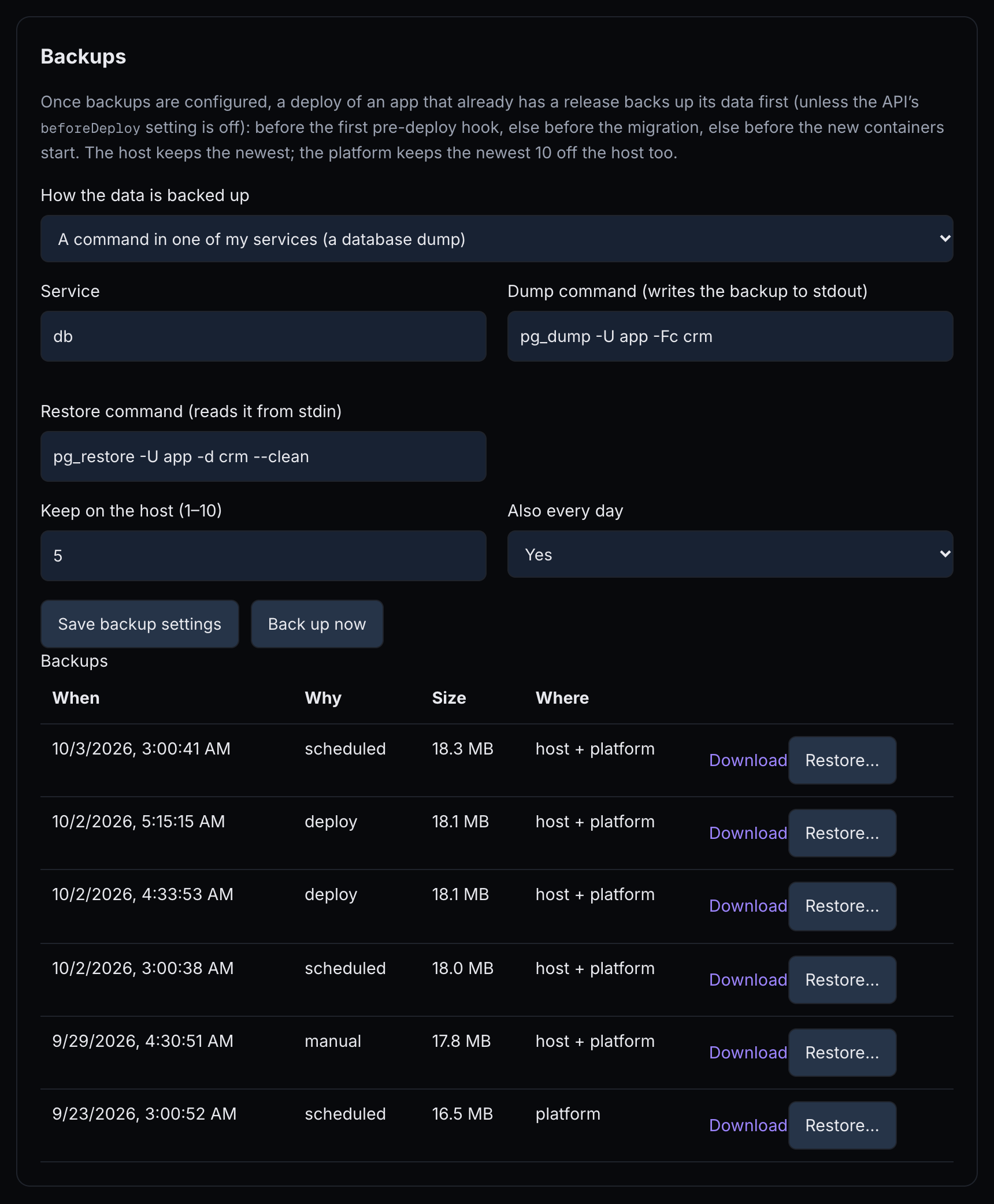 12345678910
- How the data is backed up — a command in one of your services, or a copy of named volumes.
- Dump command (writes the backup to stdout) — for example
pg_dump -U app -Fc app. - Restore command (reads it from stdin) — for example
pg_restore -U app -d app --clean. - Keep on the host (1–10) — how many copies stay on the host.
- Also every day — a daily backup as well.
- Save backup settings — saves at once.
- Back up now — starts a backup.
- Where —
host,platform,host + platformorgone. - Download — the platform's copy; the client has no download command.
- Restore… — shows what will be replaced, then asks for the slug.
The preview shows the exact command the host will run. Unlike deploy hooks, the dump and restore commands run with sh -c inside the service, so pipes and && work. Each is one line of up to 1,000 characters, and a volumes backup names 1–8 volumes.
ps-apps backup-config --apply without --file turns backups off. Without --apply it only shows that change.When backups run
- Before a deploy changes data: right before its first pre-deploy hook, else its migration, else its start. Only when backups are set up,
beforeDeployis not turned off, and the app already has a release. A failed backup stops that deploy before anything restarts (BACKUP_FAILED); the new build is already on the host, so deploy a fix before any env change. - On demand: Back up now, or
ps-apps backups --app 41 --apply --key …. Once its operation succeeds, reload the page to see the new backup in the list. - Daily, if chosen: checked every hour; it runs when the last backup is older than 23.5 hours, and is skipped while the app is busy.
Where copies are kept
The app's host keeps the newest copies, as many as Keep on the host says. The platform keeps the newest 10 copies of up to 512 MB each; larger backups stay on the host only. Where shows host, platform, host + platform or gone, and Download gets the platform's copy.
Restore
On the web page, Restore… shows what will be replaced, then asks you to type the app's slug. The message reads “Restore accepted (operation …). Follow it under Operations.” A volumes restore stops the app, replaces the volumes and starts it again; a command restore feeds the dump to the restore command. The checksum is verified, a copy no longer on the host is sent back from the platform, and your code does not change.
Read what will be replaced. Then restore:
Customer instances: use fromApp and same-owner image archive references to reuse a definition and build. Customer tags appear in app list and spend; operator quotas require explicit administrator assignment. See repeating customer instances. Exact POST callbacks use POST /api/integrations/pitchstation/webhook in Private extras; the app verifies signatures. See private webhook endpoints.
Move to another host
On the web page, choose the Destination, tick This app keeps no data (move without a backup) if that is true, press Review move, then Move. It asks “Start the move? The app is down from the source stop until the destination serves.”
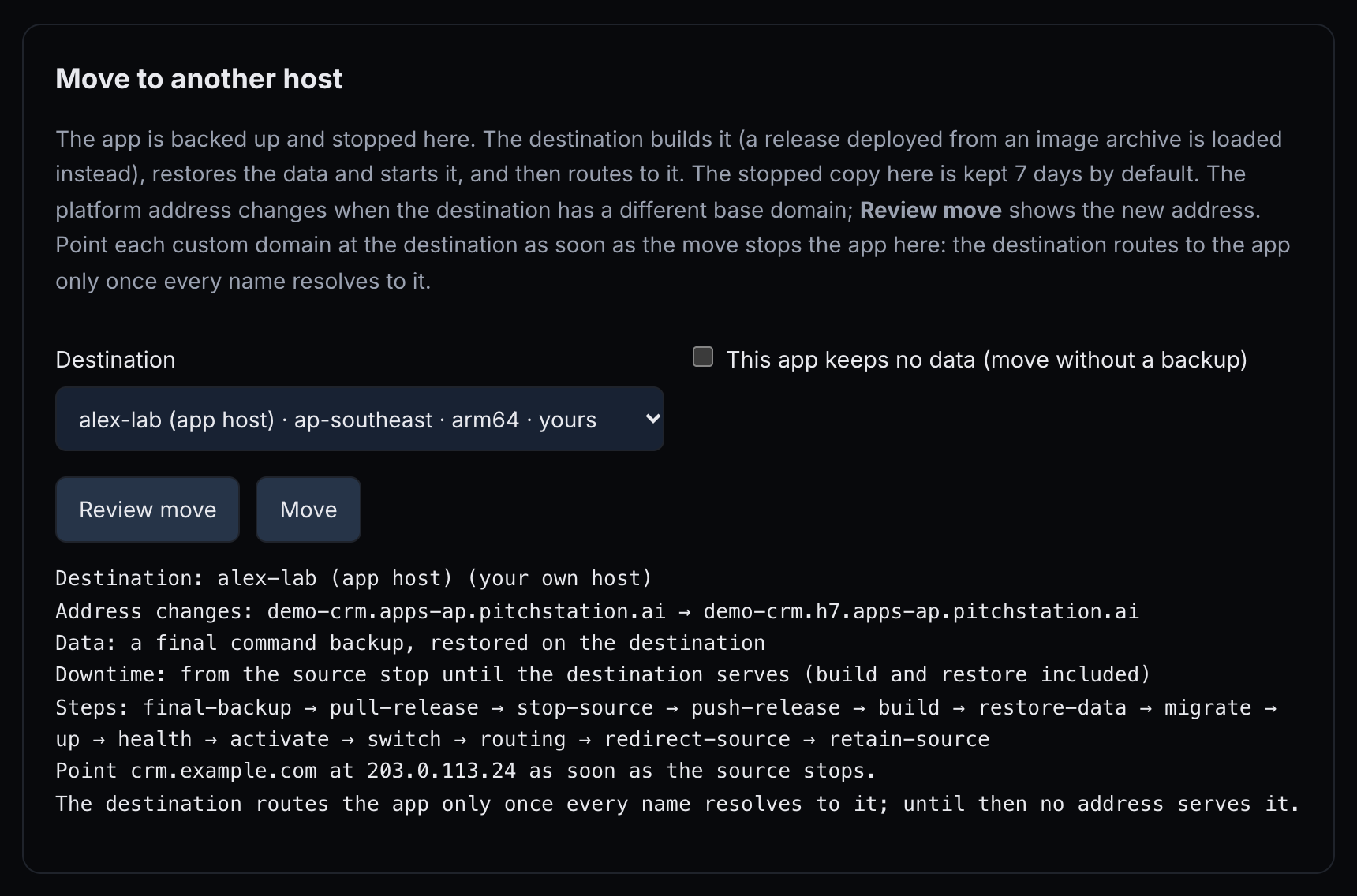 1234567
- Destination — a host you may use.
- This app keeps no data (move without a backup) — for apps with nothing to carry.
- Review move — the plan; nothing changes yet.
- Move — starts it, after a confirmation.
- Address changes: … — the platform address before and after.
- Steps: pull-release → stop-source → final-backup → … — the final volume backup follows the stop; the source stays stopped through cutover.
- Point crm.example.com at 203.0.113.24 as soon as the source stops. — the DNS change for each custom domain. Make it when the source has stopped, not after the move: as the plan's last line says, the destination routes the app only once every name resolves to it.
Read the destination, the address change, the custom-domain records and the steps. Then start the move and follow it:
--region REGION (a region that ps-apps targets shows) instead of --target lets the platform pick a host there.
- What happens: the release is copied, the source stops, a final volume backup is taken, the release is copied to the destination, built there (or its image archive loaded), the data restored, then migrate,
up, health and the routing switch. - Downtime runs from the stop until the destination serves.
- The old copy: once the move succeeds, it stays stopped for 7 days, and its addresses redirect. Remove the stopped source now frees it sooner (
ps-apps moves --app 41 --remove-source MOVE_ID). - The platform address changes when the destination has a different base domain, including an isolated host in the same region (
demo-crm.h7.apps-ap.pitchstation.ai). - Custom domains: lower their DNS TTL (for example to 300 seconds) a day before. Point each one at the destination's address, which the preview lists, as soon as the move has stopped the source (
stop-sourceinps-apps moves). The destination routes the app and issues its certificates only once every name resolves to it; until then no address serves the app. After 45 minutes the move is recorded as failed after the switch, but its routing operation keeps waiting and finishes once DNS resolves. If that operation fails too, run a rollback that names the current release (§10). - Requirements: a running release; a volume backup covering all app data, or the “keeps no data” box; data up to 512 MB; and a destination with the same CPU type, approved by an administrator, within your quota and slots. The destination must give the app another platform address (another base domain, such as an isolated host), unless per-app DNS is set up: two hosts under one base domain answer
MOVE_UNSUPPORTED. - A failure before the switch starts the app again where it was. Abort and restart the source works only for a move that was interrupted or is still queued (
ps-apps moves --app 41 --abort MOVE_ID). - After a platform restart, a move that already switched hosts is finalized if its routing operation succeeded; otherwise it is marked failed with the destination still current. Inspect the routing operation and retry routing there if needed. Failed moves keep the source without automatic removal; abort never restarts an already-switched source.
- While a move runs, changes answer
MOVE_IN_PROGRESS.
MOVE_UNSUPPORTED. Configure a volume backup covering all app data before moving. Ordinary command backups and restores remain available.The deploy guide covers Backups and restore and Moving to another host.
§14Your own host and spend
Reserve an isolated host inside your spend cap, and release it when you are done. An administrator launches each host you reserve.
- An isolated host runs your apps only, in Oregon or Singapore, arm64 or x86.
- From its first boot it runs the strict Compose rules and restricted outgoing traffic: no direct mail ports, no cloud metadata service, and a bounded rate of new connections.
- Budgets there are stored and only warn, unless the platform is set to enforce them.
- Its apps do not count against your shared-host quota.
| Size | Memory | Disk | Apps, up to |
|---|---|---|---|
| S | 2 GB | 20 GB | 3 |
| M | 4 GB | 40 GB | 6 |
| L | 8 GB | 60 GB | 12 |
| XL | 16 GB | 100 GB | 20 |
Reserve one
On the web page, open Reserve an isolated host, fill Name, Size, Architecture and Region, then press Quote.
- The name is 1–32 lowercase letters, digits and hyphens, unique among your hosts.
- The architecture is required: arm64 or amd64.
- The quote shows a monthly figure for that size, checked against your spend cap. Reserve is enabled only when it fits.
- After Reserve the message reads “Reserved. An administrator launches it; it appears as live once approved.” A reservation nobody launches lapses after 24 hours.
The cap is one monthly limit covering your isolated hosts and dev instances, set by an administrator. COST_CAP means a reservation would go over it.
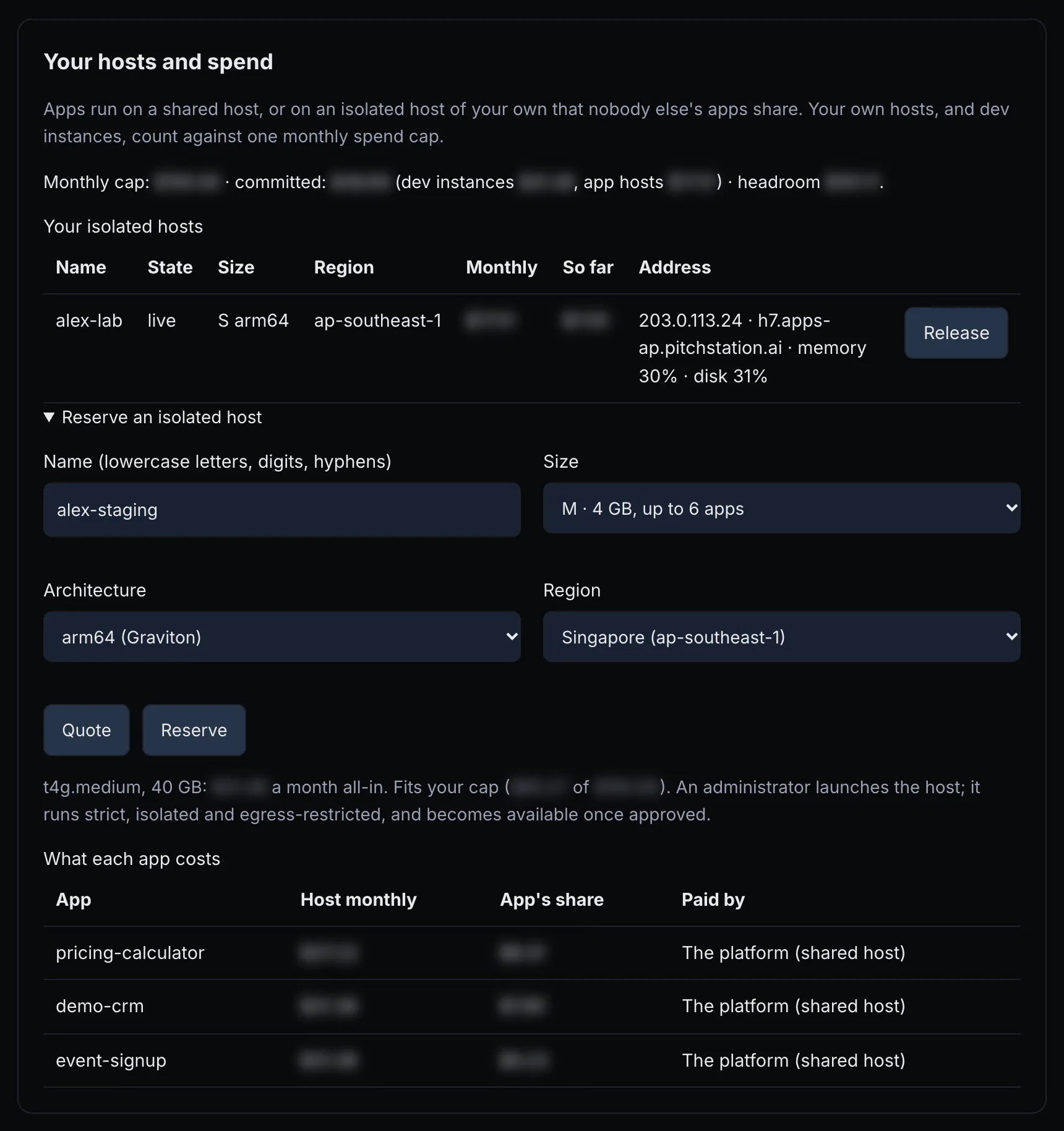 123456789
- Monthly cap — your cap and what is committed against it.
- Your isolated hosts — each host with its state, size, region and address.
- Release — lets a host go; its apps must be moved or deleted first.
- Reserve an isolated host — opens the form.
- Name, Size, Architecture, Region — the host you want.
- Quote — checks it against your cap.
- Reserve — enabled when the quote fits.
- The quote — whether it fits your cap.
- What each app costs — each app's share of its host's running cost, and who pays (below).
Check the quote against your cap. Then reserve, and see your spend:
Its address
Apps on an isolated host get the slug, the host's own label and the region's base domain, for example demo-crm.h7.apps-ap.pitchstation.ai, unless per-app DNS is set up for the platform.
Host reports and growth
The host reports its memory and disk every 5 minutes. The list says “silent: no report for 15 minutes” when reports stop, and a “Growth” line proposes the next size when memory or disk stays above 85% for half an hour.
Release it
Cancel a reservation, or Release a live host. Releasing asks “Release …? An administrator terminates it; apps must be moved or deleted first.” A host that still has apps answers HOST_STATE_CONFLICT. In a terminal: ps-apps hosts --release ID, with the id that ps-apps hosts lists (not the host id from ps-apps targets). It acts at once, with no preview and no confirmation.
What each app costs shows each app's share of its host's running cost, split by memory budget. Paid by reads “You (your host)” for your own host, which counts in your spend cap, or “The platform (shared host)” for a shared host, which does not. The deploy guide covers this in Your own host and spend, and the host rules in Strict hosts, egress and acceptable use.
§15Limits and rules
Every number and rule in one place.
Limits
| What | Limit |
|---|---|
| Apps on shared hosts | 3 per person, unless an administrator sets another number (0–100). |
| Slug | Lowercase letters, digits and hyphens, up to 40 characters, starting and ending with a letter or digit; unique across PitchStation Apps; fixed. |
| Hostnames | 10 per app, counting the platform address. Name claims: 20; an unverified claim lapses after 24 hours. |
| Domain or access plan | 15 minutes. |
| Readiness result | 5 minutes; a check within 30 seconds of the last returns the last result. |
| Source upload | 80 MiB compressed, 256 MiB unpacked, 20,000 files, paths up to 1,024 bytes. The client gives the deploy upload 15 minutes; calls other than uploads give up after 30 seconds. |
| Image archive | Up to 1,024 MB with 1–50 images saved by name:tag; the newest 3 are kept, plus the running release's; an upload may take up to 60 minutes. |
| Step time limits | Build 20 minutes, migration 15, up 10, health 5; any remote step 30. |
| Health check | 200 within about 60 seconds; a redirect fails. |
| Build ceiling (needs host setup) | 40% of the host's memory, at least 1,024 MB, and 1 CPU; one build at a time. |
| Budget | Default 512 MB, 1 CPU, 256 processes; range 64–16,384 MB, 0.1–16 CPUs, 32–4,096 processes. |
| Environment | Keys of letters, digits and _, not starting with a digit, up to 128 characters. Values one line, up to 16,384 characters. Up to 200 changes at once and 128 KiB in total. Reserved: PORT, HOST_PORT, COMPOSE_*, DOCKER_*. |
| Deploy hooks | 5 before and 5 after; 1–1,800 seconds each (default 300); a command is one line of up to 2,000 characters and 100 words. |
| Read-only services | 16. |
| Password | 12–72 bytes (UTF-8), one line. |
| Sign-in session | 12 hours, never past the expiry. Wrong passwords on the sign-in page: 10 in 10 minutes from one address, then a 10-minute wait. |
| Access links | 50 active; expiry within 366 days; labels up to 80 characters. |
| Private app extras | 5 callback paths and 5 cache paths; 50 people and 20 teams. Callback paths have a 60-second read timeout and are not cached. |
| Requests to your app | Bodies up to 64 MiB; a 300-second read timeout; WebSockets pass through. |
| Status and logs | 10 reads a minute per person per app (a cached status answer does not count); up to 1,000 lines or 256 KiB; status is cached for 15 seconds. |
| Operations | One at a time per app; the latest 30 are listed; failed-step output is kept 30 days. |
| Reconcile | An inspection is valid 15 minutes; the note is 8–1,000 characters. |
| DNS waiting | About 75–90 minutes before failing. A certificate rate limit blocks retries for 60 minutes. |
| Backups | Keep 1–10 on the host; the platform keeps 10, each up to 512 MB; daily when the last is older than 23.5 hours. Backup commands are one line of up to 1,000 characters, run with sh -c; a volumes backup names 1–8 volumes. |
| Moves | Data up to 512 MB; the old copy is kept 7 days. |
| Isolated hosts | Sizes S, M, L, XL; names of 1–32 lowercase letters, digits and hyphens; a reservation lapses after 24 hours if nobody launches it. |
| Host port | One per app, in 41000–41999, on the host's loopback only. |
| Release list | The 20 most recent (ps-apps releases). |
Rules
Compose rules. Shared and strict hosts refuse these settings; your own standard host warns about them:
privileged;- the host's or another container's network, PID, IPC, UTS, user or cgroup namespace;
cap_add,devicesand GPUs;cgroup_parent, security options that weaken isolation, and anotherruntime;- the Docker socket; bind mounts, env files, build contexts and
extendsorincludefiles outside the project; - external volumes or networks, volume names outside your app's own, and drivers that are not local;
- any published port other than
127.0.0.1:${HOST_PORT}mapped to your container port, on the web service only; - a
${…}in those settings other than${PORT}and${HOST_PORT}.
The deploy guide lists them with examples in Deploy a release.
- Strict hosts: only a reviewed list of Compose keys; container names start with
ps-SLUG-; logs go tojson-fileorlocal; every service runs with no-new-privileges. See Strict hosts, egress and acceptable use. - Exemptions: on an owner's own host only, an administrator can exempt one reviewed finding for one app. Shared hosts never exempt.
- Restricted egress (isolated hosts): no outgoing mail on ports 25, 465 or 587; no cloud metadata service; 30 new connections a second per container, with bursts to 120. Send mail through an email API over HTTPS.
- Publisher terms: when your platform requires them (§01). The version and text are on the Apps page.
- Reports and takedown: anyone can report an app at /abuse.html. An administrator can take an app down; it then answers 404, and you cannot change it until the takedown is lifted.
- Records: log reads (yours and administrators'), sign-ins with PitchStation, publishes and per-app events are recorded.
The overview's Limits and the API reference's Limits repeat the main numbers.
§16Glossary
| Term | Meaning |
|---|---|
| Access link | A link that opens a private app for one named person without the password, with a session of up to 12 hours each time; it works until it is revoked or expires (§06). |
| Alias | An extra hostname that serves the app or redirects with 308 to the primary hostname (§05). |
| App | The permanent record of one deployable project: slug, host, web service, container port, health path, settings, access and encrypted env. |
| Application policy | What your app restricts by itself: unknown, none or restricted. A public app passes readiness only with none (§06). |
| Budget | The memory, CPU and process limits of one app; enforced on shared hosts (§09). |
| Build ceiling | The memory and CPU a build on a host may use; a build over it fails with BUILD_LIMIT_EXCEEDED (§04). |
| Build-time key | An env key a framework bakes into the build, such as NEXT_PUBLIC_*; changing it needs a redeploy (§08). |
| Callback path | A path prefix on a private app served without the password, for signed machine callbacks (§06). |
| Cache path | A path prefix whose responses a signed-in viewer's browser may keep (§06). |
| Compose file | The file that lists your app's containers, called services; the client writes one for Vite and Next.js projects (§04). |
| Container port | The port your web service listens on inside its container; fixed at creation. |
| Deploy settings | The migration, its service, deploy hooks and the Compose file's path (§08). |
| Dry run | A preview that changes nothing: deploy, env, rollback, restore, move, backup-config, resources, settings, hardening and hosts --file without --apply; domains plan and policy plan; and the Review, Preview and Quote buttons. A deploy dry run with an image archive still uploads the archive (§04). These act at once: create, links --create and --revoke, hosts --release, moves --abort and --remove-source, images --file and --remove, retry, cancel, and reconcile (its inspection pauses the app's operations). |
| ETag | The configuration version a plan was made against; an apply must send it. |
| Event date | An optional date for your records; it warns when the expiry comes first. |
| Expiry | The moment every address of the app closes with 410 (§06). |
| Health path | The path each deploy checks for HTTP 200; fixed at creation. |
| Hook | A command run in a one-off container before the migration (pre-deploy) or after the health check (post-deploy) (§08). |
| Host | A server that runs apps: a shared host, or an isolated host of your own (§01, §14). |
| Identity marker | Text your home page always contains, which readiness looks for (§05). |
| Idempotency key | A name for one intent; repeating a request with it returns the same operation (§04). |
| Image archive | Images you built elsewhere, saved with docker save and gzip, that the host loads instead of building (§04). |
| Operation | An accepted change running in the background, with an id and steps (§10). |
| Permission | “Deploy hosted apps (containers)” (app.deploy), granted by an administrator (§01). |
| Placement | The platform's choice of host for a new app, when you do not name one. |
| Plan | A reviewed domains or access change, kept for 15 minutes until you apply it. |
| Platform address | The address PitchStation gives the app, such as demo-crm.apps-ap.pitchstation.ai (§05). |
| Primary hostname | The app's main address; redirects point to it. |
| Quota | How many apps you may have on shared hosts; 3 by default. |
| Readiness | Public checks that prove each address serves this app with the right access (§09). |
| Receipt | A redacted summary of what is published, without passwords (§09). |
| Reconcile | Inspecting the host and confirming what happened after an uncertain failure (§10). |
| Release | One numbered deploy of your code; ps-apps releases lists them (§04). |
| Rollback | Running an earlier release's Compose file again; it restores code only when each release's images carry their own tag (§10). |
| Service | One container definition in the Compose file, such as web or db. |
| Slug | The app's name in its address; lowercase, unique and fixed. |
| Spend cap | Your monthly limit for isolated hosts and dev instances, set by an administrator (§14). |
| Strict host | A host that accepts only reviewed Compose keys and runs every service with no-new-privileges (§15). |
| Takedown | An administrator stopping an app after a report; it answers 404 until lifted. |
| Terms | The publisher terms some platforms require before you create or deploy (§01). |
| Volume | A named Docker volume; the place where data survives releases (§13). |
| Web service | The Compose service that receives visitors; the only one that may publish a port; fixed at creation. |
§17FAQ
Does changing a domain or the access rebuild or restart my app?
No. Those plans show no builds and no restarts.
Can I see my app's password again?
No; only a hash is stored. Set a new one, which signs everyone out.
Will my app keep working if PitchStation itself is down?
Yes. Running apps keep serving, and passwords, access links, the expiry and redirects are enforced on the host, where certificates also renew. Changes, deploys, status and log reads, and new sign-ins with PitchStation need PitchStation.
Who can read my app's logs?
You and administrators. Every read is recorded, and values from your env are masked.
Can a teammate manage my app?
Each app belongs to the account that created it, and the page and API show only your own apps. Give teammates access to the running app with access links or Sign in with PitchStation.
Can I rename the slug or change the port later?
No (§08, What cannot change after creation).
How do I find a release id for a rollback?
Run ps-apps releases --app 41. It lists the 20 most recent releases and marks the live one.
Does a rollback bring back my old code?
Only when each release's built images carry their own tag, or the release came from an image archive with its own tags. Otherwise a rollback brings back the older Compose file but starts the newest build (§10, Roll back).
The client says “Unknown command” for archive, images, settings or releases
Download the client again with the install box in §02.
Why can't I accept the terms from the command line?
Accepting needs a signed-in browser session. Use the Apps page.
My MCP assistant finds no token
The server reads PITCHSTATION_MCP_TOKEN or PITCHSTATION_TOKEN, not PITCHSTATION_APPS_TOKEN. A token without the Apps scopes sees no Apps tools.
I don't see Apps in my sidebar
You need the permission from an administrator. You can still open /apps.html, which then shows CAPABILITY_REQUIRED. If an administrator has granted it and the item is still missing on another page, open pitchstation.ai/apps.html directly.
Is my data backed up off the host?
Only if you set up backups. The platform then keeps the newest 10 copies, up to 512 MB each, away from your app's host.
Can my app send email?
On isolated hosts, outgoing mail ports are blocked; use an email API over HTTPS.
Do search engines index my private app?
No. Private responses carry noindex, nofollow. They are not cached either, apart from cache paths and responses your app marks immutable, which only the signed-in viewer's browser keeps.
What happens to access links when I change the password?
Their sessions end, but the links still work until you revoke them or they expire. Opening a link again starts a new session of up to 12 hours.
What if I close my laptop during a deploy?
The operation continues. Follow it again with ps-apps operation … --watch, or repeat the same command with the same key.
How long can a deploy take at most?
Each step has its own limit: the upload 5 minutes, the build or image load 20, the pre-deploy backup 20, each deploy hook up to 30 (five before and five after), the migration 15, up 10 and health 5; any other remote step 30. Waiting for DNS adds up to about 90 minutes. So a deploy with hooks can take hours. --watch stops after 5 minutes, but the operation does not.
Do I need Docker on my computer?
Not to deploy: the client packs your project and the host builds it. You need Docker only to build image archives yourself, or to try the app locally.
Why was everyone signed out of my private app?
A plan or deploy carried a password, even an unchanged one; or the People and Teams list was cleared, which ends every account session. Leave password out of policy.json, and --password-file off later deploys, unless you mean to change it (§06).
§18For administrators
What only an administrator can do, and where it is done.
- Grant access: the admin page, Users, the person's feature access, “Deploy hosted apps (containers)”.
- Set a person's shared-host quota (0–100).
- Set the monthly spend cap, “Dev-instance cap (USD/month)”, which also covers isolated app hosts.
- Hosts: run the host check and onboarding, which installs the build ceiling and the host reporter; approve live publishing and pool membership; set strict rules and restricted egress; grant Compose exemptions on owner hosts.
- Launch the isolated hosts people reserve.
- Resolve operations marked
reconcile.by: "operator". - Handle abuse reports and takedowns, and decide whether publisher terms are required (a server setting).
- Switch live publishing on or off (
LIVE_DISABLED).
The architecture page explains the moving parts: The pieces, milestone 2, milestones 3 and 4 and What stays stable. Host rules for owners are in the deploy guide's Your own host and Strict hosts.